
What you will learn in this guide:
- What Shopify customer service outsourcing actually means and when your store needs it
- How to audit your workload, document your SOPs, and choose the right outsourcing model
- The five steps to go from overwhelmed founder to a fully operational outsourced support team
- How much it costs, which tools to use, and what KPIs to track from day one
Who this is for: Shopify store owners doing 30 or more tickets a day who are spending too much time on support and not enough time growing their business.
It usually starts small. A few customer emails here, some order questions there. You can handle these easily because you know your product better than anyone.
Your store grows, and one day you wake up to 60 new tickets. Customers wait for days to get a response. Delay in customer support: significantly increased product return and cancellation rate. These are not pointing at the product. The root cause is poorly managed customer support. Customers expect quick responses and accurate answers to their queries.
Sound familiar? This is the exact point where most Shopify store owners start exploring Shopify customer service outsourcing.
This guide helps you understand Shopify customer service outsourcing and how it works for your store with control over your brand without overpaying for mediocre support and spending weeks on setup. We will cover what to audit, what to document and the models that fit your unique business models based on the store size and performance tracking methods after you hand things off.
Let's get into it.
A dedicated Shopify virtual assistant for tickets, order edits and store updates, onboarded in 60 minutes.
Hire a Shopify virtual assistant →
What Is Shopify Customer Service Outsourcing?
Shopify customer service outsourcing means handing off some or all of your customer support tasks to an external team or provider, instead of managing them in-house. That team handles your tickets, chats, emails, and sometimes phone or social DMs on your behalf.
This is not like hiring a full-time employee. Outsourcing eCommerce customer service takes out the burden of managing payroll, benefits, or office space. You are paying for a service, and you scale it up or down based on your business requirements.
For most stores, the goal is to reduce costs and response times at the same time.
Here are the common tasks taken care of under Shopify customer service outsourcing
- Order status and tracking queries
- Returns, refunds, and exchange requests
- Product questions and pre-sale support
- Post-purchase follow-ups
- Review and feedback management
- Order edits and fulfilment problems (wrong address, split shipments, delays)
- Inventory and back-in-stock questions
- Product listing corrections when a customer flags an error
If you also sell on Amazon, the same assistant can answer buyer messages in Amazon Seller Central.
When Should You Consider Shopify Customer Service Outsourcing?
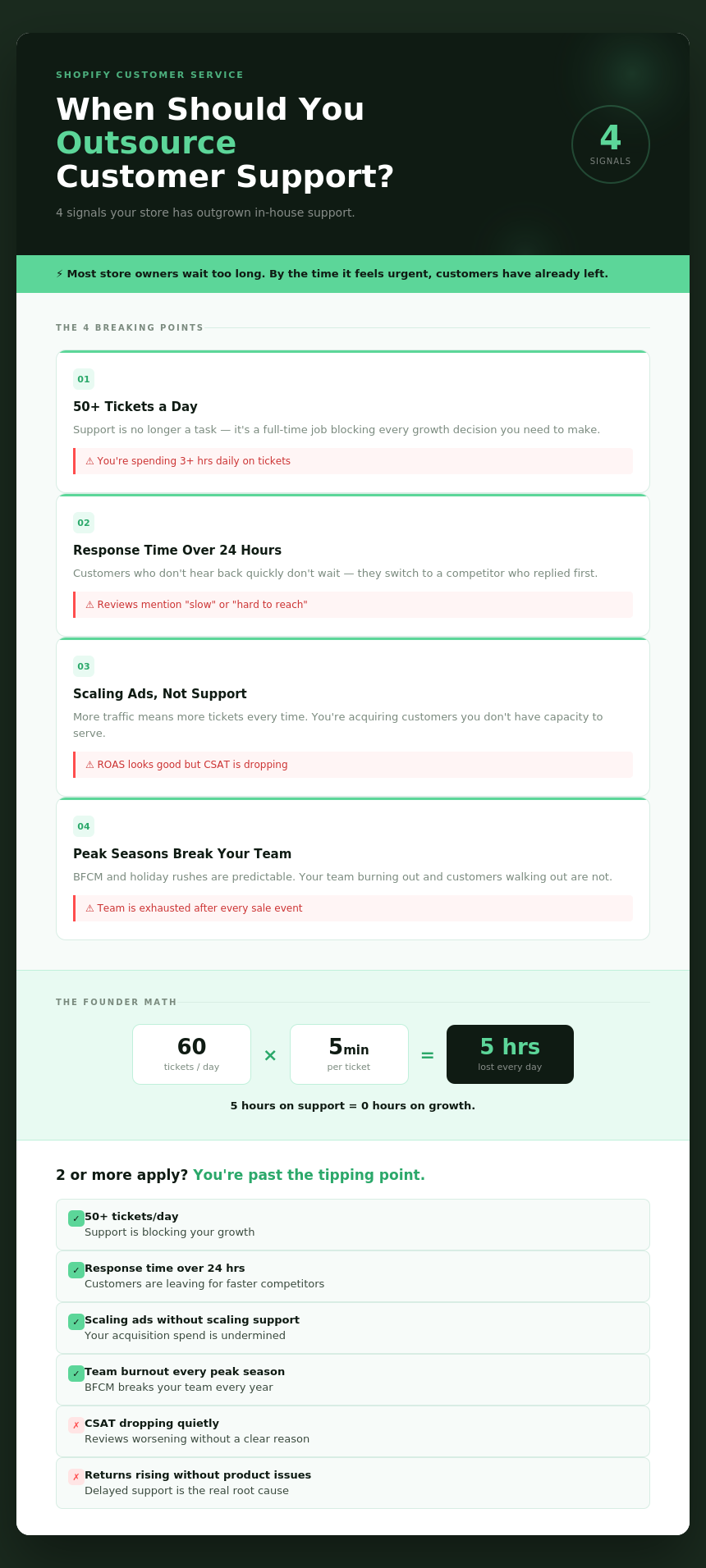
There are clear signals you can notice in your store to understand when to outsource customer service. Here are a few:
- Manually Handling 50+ Tickets a Day
At this volume, customer support stops being a side task. It becomes a full-time job. If the business owner or a team member is spending 3+ hours daily on tickets, the time used for growth tasks such as marketing, products or operations gets drained. As a result, the growth takes a back seat.
- Response Times are Consistently above 24 Hours
According to a 2023 Salesforce report, 83% of customers expect an immediate response to simple queries. If the store regularly takes more than a day to respond, it’s not just developing frustration among customers; it sends them to a competitor who got back to them first.
- Scaling Ad Spend but not Support Capacity
More traffic directly increases orders and tickets. If you're running paid ads or entering a growth phase but your support setup hasn't changed, the gap between demand and capacity widens fast. This is when outsourcing eCommerce customer service starts making financial sense. For a wider view of support options, see our e-commerce virtual assistants page.
- Peak seasons are overwhelming your team
How to Get Shopify Customer Service Outsourcing Right
Here’s a step-by-step guide to outsourcing Shopify customer service the right way:
Step 1: Audit Your Support Workload Before You Outsource
Before you bring anyone in, you need a clear picture of what you're actually handing over. Skipping this step is one of the most common mistakes Shopify owners make when starting with customer service outsourcing for Shopify.
How to calculate your weekly ticket volume in Shopify
Get the last 3 months of support data from the helpdesk - Gorgias, Reamaze, or even Gmail. Look at these numbers:
- Total tickets per week
- Average handle time per ticket
- Ticket type breakdown (returns, tracking, product questions, complaints)
- Peak days and times
This gives you the information your future outsourcing partner will need to scope the work and quote a price.
Which channels need coverage?
Not all support is the same. Map out which channels your customers actually use:
- Email (most common for post-purchase)
- Live chat (often highest conversion impact for pre-sale)
- Social media DMs (Instagram, Facebook)
- Phone (less common for DTC but important for some product categories)
Covering all channels from day one adds cost. You can start with the highest-volume channel, followed by the lowest ones.
What does your current CSAT look like?
If you have CSAT data, document it. If you don't, this is a good time to start measuring it. This helps you to measure whether Shopify customer service outsourcing is improving or hurting your customer satisfaction after the handoff.
Real example: An eCommerce brand - Daniel House Club chose Wishup virtual assistant to manage 380,000+ SKUs and witnessed a drastic change in their business. Their discontinued order rate stayed below 1% against a 2% target, a direct result of having a dedicated, documented support and operations process in place before scaling.

Step 2: Document Your SOPs and Brand Voice
This is the step most store owners skip. That makes the outsourcing of Shopify customer support often sounds robotics, off-brand or just wrong.
Your outsourced team can only be as good as the information you give them. If you hand off tickets without documentation, you're setting everyone up to fail.
What to prepare before handing off
- Brand voice guide: Describe your tone. Are you warm and casual? Professional and concise? Give 3 to 5 examples of good and bad responses.
- Refund and return policy: State exactly what agents can approve without escalating, and what needs your review.
- FAQ document: Answer the 20 questions that make up 80% of your tickets. This alone cuts handle time dramatically.
- Escalation rules: What goes to you, what goes to a team lead, and what can be resolved on the spot.
Shopify-specific flows to document
Because you're running on Shopify, some flows are unique to your setup. Document these specifically:
- How to look up and modify orders
- How to process a refund or exchange in your system
- How to check shipping status with your carrier integrations
- How to flag a fraud risk order
If you use Gorgias or Reamaze, document the macro templates agents should use. Consistency here prevents brand dilution over time.
How to write a CS playbook your outsourced team can actually follow
Keep it simple. A Google Doc with clear sections works fine. The goal isn't a 50-page manual. It's a reference guide that an agent can open during a live ticket and get the answer they need in under 60 seconds.
Step 3: Choose the Right Shopify Customer Service Outsourcing Model
All Shopify customer service outsourcing is not the same. There are 4 main models. Choose the right one based on the volume, budget, and the amount of brand control that matters to you.
A Shopify Virtual Assistant combines hands-on store management with personalized customer support, making it a scalable solution for businesses of any size.
Step 4: Vet and Shortlist Your Shopify Customer Service Outsourcing Partner
Choosing the right Shopify customer support outsourcing partner is not just about the pricing. The wrong partner can damage your brand reputation faster than doing nothing at all.
Questions to ask any eCommerce customer service outsourcing company
- Do you have experience specifically in Shopify or just in general eCommerce?
- Tools that the agents work in
- How do you handle peak volume surges like BFCM?
- About the onboarding process and the time taken for it
- How do you report on performance (FRT, CSAT, resolution rate)?
- What are your SLA commitments, and what happens if they're missed?
Red flags to watch for in contracts and SLAs
- No performance guarantees in writing
- Minimum contract lengths over 3 months without a trial period
- Vague language around data security and customer information handling
- Companies that can't be replaced if performance is poor
How to run a paid trial before committing
Get a 2 to 4-week paid trial before signing any long-term contract. Use this period to evaluate response quality, accuracy, brand voice adherence, and escalation handling. A provider that resists a trial period for outsourcing Shopify customer support and services is one you should walk away from. Brands like Wishup replace the Shopify Virtual Assistant based on the client’s request.
What Our Clients Say About Wishup
Step 5: Onboard and Integrate With Your Shopify Helpdesk
Getting your outsourced team set up correctly from the start determines how smoothly your Shopify store customer service outsourcing runs for the next six months.
Helpdesk tools that work natively with Shopify
These platforms connect directly to your Shopify store so agents can view and manage orders without needing full admin access:
- Gorgias: Purpose-built for eCommerce, pulls order data directly into the ticket view. Most popular choice for Shopify stores.
- Reamaze: Strong for stores with high social media support volume. Handles DMs, chat, and email in one inbox.
- Richpanel: Focused on self-service. Customers can resolve common issues themselves before a ticket even opens.
- Tidio: Best for live chat and AI deflection. Good entry point for smaller stores.
How to give agents limited Shopify access safely
In the initial days of collaboration, try to give limited access to the outsourced agent rather than giving full admin access. Create a custom staff account in Shopify with the necessary permissions they need:
- Orders: view, edit, and process refunds
- Customers: view profiles and order history
- No access to: settings, billing, apps, or reports
Until you build trust, analyze the capacity of the assistant and ensure the access that helps scale up the business.
KPIs to track from day one
Set these benchmarks before your Shopify customer service outsourcing goes live. Review them weekly for the first 30 days.
How Much Does Shopify Customer Service Outsourcing Cost?
This is one of the most common questions store owners search for before making a decision. The answer depends on your ticket volume, the model you choose, and the channels you need covered.
For context: In the US, a full-time customer support agent costs $42,830 per year in salary, excluding benefits and tools. Outsourcing eCommerce customer service at $1,500 to $2,500 per month for a dedicated agent delivers comparable coverage at roughly half the cost.
Common Mistakes to Avoid With Shopify Customer Service Outsourcing
Outsourcing before SOPs exist
Handing off tickets without documentation is the single biggest reason Shopify customer service outsourcing fails. Agents make it up as they go, responses become inconsistent, and customers feel it. Write your SOPs first. Even a rough 5-page Google Doc is better than nothing.
Choosing on price alone
The cheapest eCommerce customer service outsourcing option usually ends up costing more in the long run, either through high agent turnover, poor CSAT, or brand damage that takes months to repair. Evaluate quality signals: response samples, case studies, references from other Shopify merchants.
Not tracking quality metrics after handoff
Shopify customer service outsourcing is not a set-it-and-forget-it decision. Schedule a weekly check-in for the first 60 days. Review ticket samples randomly. Track CSAT trends. If quality slips, address it immediately before it compounds.
Giving up too much brand control
Your brand voice is not a nice-to-have. It is part of your product. One robotic or off-tone support interaction can undo the goodwill of a great product experience. Build brand voice training into your onboarding, and review it quarterly.
Shopify customer service outsourcing works when you audit first, document second and hand off third. Wishup's Shopify virtual assistants onboard in 60 minutes, so you can start with your highest-volume channel this week.
