
People judge your business visually before they read a single line of copy. That means inconsistent creatives, outdated decks, weak social media graphics, or poorly designed assets can hurt trust before your offer even gets a chance.
100 milliseconds. That is all it takes for brands to create an impression in their targeted consumer’s mind. What’s mind-boggling is that that impression only takes 7 seconds to solidify, giving visitors a window of 50 milliseconds to make a first impression.
What is even more striking is that this impression forms almost instantly, long before a visitor reads your copy or understands your offer. That is exactly why having a graphic design virtual assistant can make such a difference.
From social media creatives to presentations, ad visuals, and branded assets, strong design support helps your business look polished, credible, and memorable at first glance. This blog will showcase everything you need to know about VAs for graphic design.
Who Is A Graphic Design Virtual Assistant?
A graphic design virtual assistant is a remote professional who supports businesses with ongoing visual design work.
They help create, edit, resize, format, and organize branded assets such as social media graphics, presentations, website designs, ad creatives, marketing materials, and other recurring design requests.
Instead of hiring a full-time in-house designer for everyday creative needs, businesses often use a design virtual assistant for consistent, flexible, and cost-effective design support.
Why Do Businesses Hire a Virtual Graphic Design Assistant?
Strong visuals boost trust 2.6 times and can improve trust and first impressions. Therefore, a graphic design VA offers tangible advantages that make it essential in any business. Apart from capturing attention to the brand itself that lingers in the mind, the key benefits include:
1. Saving cost
Cost saving is one of the top reasons why you should consider hiring a VA for designing posters and promotions rather than hiring an in-house graphic designer.
By outsourcing the design tasks on an hourly or project basis, not only would you be able to save time, but it would also be easier to manage than hiring full-time for recurring small design needs. Following is a breakdown of how they can be beneficial:
2. Get access to pre-vetted, specialized talent from a global pool
Hiring a graphic design virtual assistant gives you access to pre-vetted talent with niche-specific experience, without spending weeks on sourcing, screening, and training.
Instead of starting from scratch, businesses can work with professionals who already understand design tools, brand consistency, content workflows, and the fast turnaround needed for ongoing creative support.
3. Setting up a flexible and scalable workflow
Set up a flexible workflow, be it for one campaign or for an ongoing marketing effort. With a design VA, you can scale up and down depending on your business requirements. It also offers a more flexible cost structure.
4. Maintaining brand consistency throughout the design process and creatives
A graphic design virtual assistant helps maintain brand consistency across every creative asset by following your visual guidelines, brand colors, fonts, tone, and layout standards.
Whether it is social media posts, presentations, or marketing materials, this ensures your business looks cohesive, professional, and instantly recognizable across every customer touchpoint.
5. Global and time zone coverage
A VA in graphic design who is not limited by geographical restraints can provide around-the-clock service to you as your business demands. Wishup’s VAs support businesses across different time zones.
It makes it easier to keep design requests moving, meet tighter turnaround times, and ensure your creatives are ready when your team or audience needs them.
6. Save time
It goes without saying that you will save time by hiring a virtual graphic design assistant in more than two or three ways:
- You will not have to invest the time to train them, as you would do for a full-time employee.
- Hiring and onboarding time as well. Since VAs will be pre-vetted in a specialised niche, they can hit the ground running with minimal time spent.
- The time you spend working on creatives yourself.
These benefits, combined with the fact that your graphic design virtual assistant is already pre-vetted and assessed, mean you get someone ready to contribute from day one.
With the right creative skills, reliability, and support mindset, they can quickly become a valuable part of your business operations. To understand where a graphic design VA adds the most value, it helps to look at the kind of recurring design work businesses regularly delegate and the VAs can handle:
What Tasks Can a Graphic Design VA Handle?
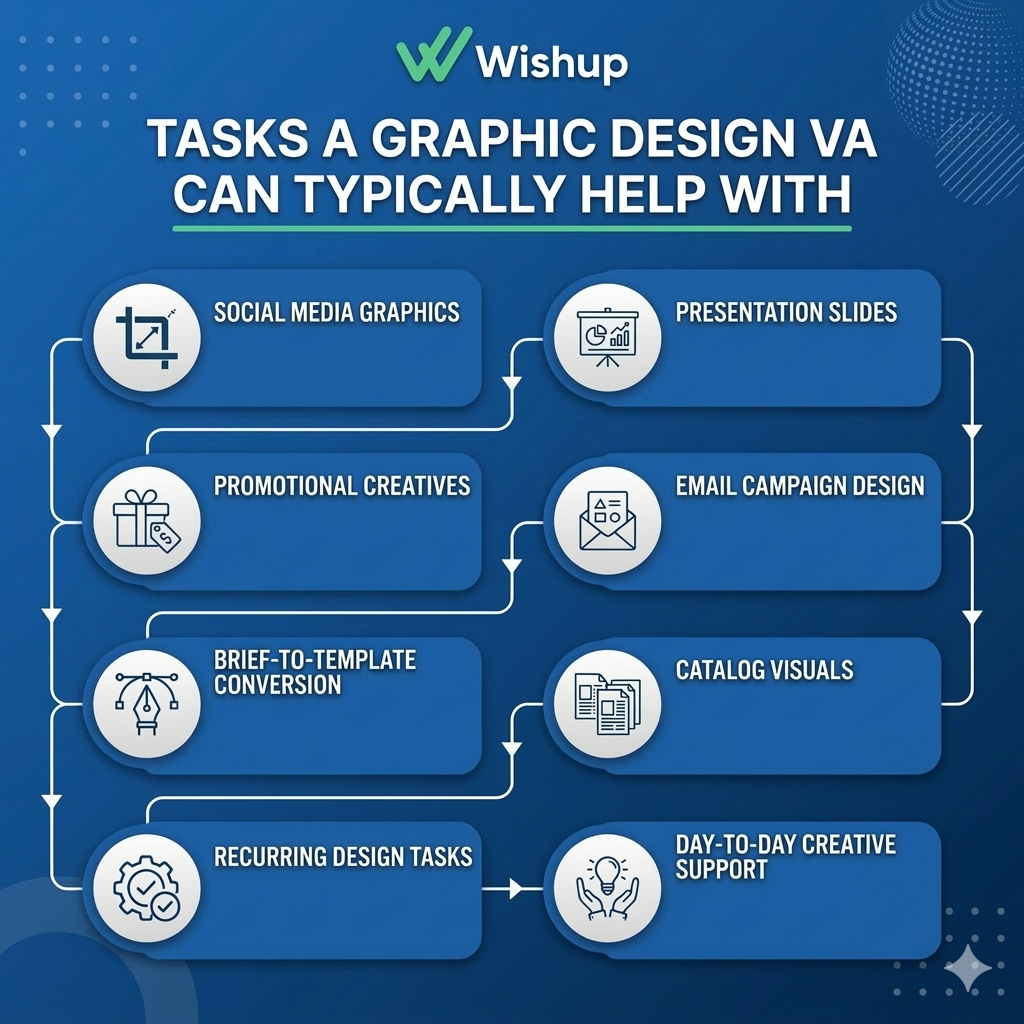
A graphic design virtual assistant supports the steady stream of design work that keeps a business looking active, polished, and consistent. That means a graphic design VA can typically help with:
- Creating and resizing social media graphics for ongoing posting needs
- Designing branded creatives for promotions, campaigns, and announcements
- Preparing presentation slides, one-pagers, and visual sales materials
- Organizing and updating product or catalog visuals for listing-based businesses
- Supporting email campaign design with simple banners, headers, and branded layouts
- Turning rough briefs into reusable templates for faster content production
- Maintaining visual consistency across recurring graphic design tasks
- Providing day-to-day creative support so founders and teams do not get stuck on small but necessary design requests
In many businesses, the role of a design virtual assistant is not limited to making individual creatives.
They also help maintain workflow continuity by managing revisions, repurposing existing assets, formatting content for different platforms, and supporting teams that need reliable graphic design services without building a full in-house design department.
Skills And Expertise Of A Good Graphic Design Virtual Assistant
A strong graphic design virtual assistant needs a mix of design ability, execution discipline, and day-to-day business support skills. Here are the core skills a graphic designer VA should have:
1. Canva, Figma, Adobe Creative Suite
The VA should be an expert in Adobe Creative Suite, Figma, and Canva, Pippit for creating professional designs.
- Canva for quick branded graphics, presentations, and templates
- Figma for collaborative layouts, interface mockups, and visual systems
- Adobe Photoshop and Illustrator for image editing, vector design, and advanced creative work
- Adobe InDesign for brochures, catalogues, and multi-page collateral
- Pippit for fast poster creation, promotional graphics, and visually clear campaign assets designed for digital-first publishing
2. Visual design fundamentals
They should understand layout, spacing, hierarchy, typography, color use, and brand consistency. This matters because recurring design work often includes social media assets, marketing creatives, and presentation-ready visuals that need to look polished and on-brand.
3. Branding and template handling
A good design VA should know how to work within established brand guidelines rather than designing everything from scratch each time. They should be comfortable updating templates, reusing visual systems, and keeping all assets consistent.
4. Social media creative execution
Since social media management is one of the service areas listed, a design VA should be able to create platform-ready visuals, resize creatives, adapt content for different formats, and support regular posting workflows.
5. Creative and innovative agent
The VA should have the ability to think outside the box and come up with creatives that are unique, engaging, and hook the audience’s attention.
6. Strong communication skills
A VA should have the ability to communicate and understand the requirements of the clients because what they understand is what will translate into the design.
7. Technical knowledge
A design VA should have adaptability towards understanding, using, and experimenting with technical aspects of design. The best-suited VA should have a thorough understanding of web design principles, responsive design, and SEO basics. Such knowledge will help them design creatives ready to be optimized for different platforms.
8. Attentive
To create designs free of errors and of high quality requires attentiveness. Moreover, a designer should pay closer attention to color schemes, layout, typography, and other design aspects to maintain brand consistency.
9. Time and project management skills
Time and project management skills are a must-have for designing VAs. You would need someone who has mastered managing many projects with minimal supervision, all while meeting deadlines.
Moreover, the ability to plan, execute, and oversee quality projects requires not only ownership but management skills. Possession of such skills ensures smooth workflow and efficient collaboration with clients.
10. Insight into what the market demands
Most designs and creatives fall under marketing collaterals, which makes it essential for designers to have an idea of what the market demands of them. Having basic marketing principles can assist the design virtual assistant in driving engagement and conversions.
Tools Graphic Design VAs Use
A graphic design virtual assistant usually works across a mix of design, content, and publishing tools to keep creative work moving efficiently.
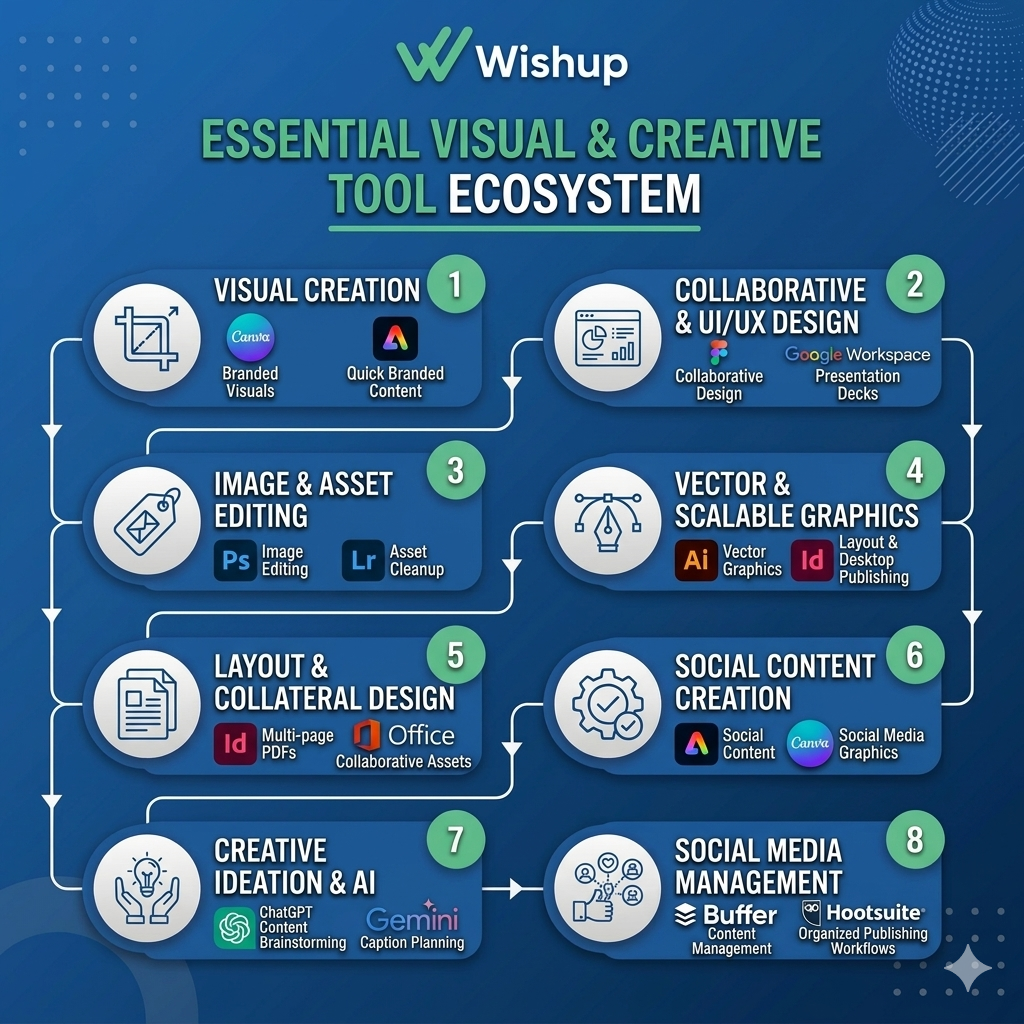
Here is how these tools fit into graphic design support:
- Canva for creating branded visuals, social media graphics, presentations, and reusable templates.
- Figma for interface layouts, collaborative design, wireframes, and quick web or landing-page mockups. Figma positions itself as a collaborative design platform for designing, prototyping, and building products faster.
- Adobe Photoshop for image editing, retouching, mockups, and creative asset cleanup. Adobe lists Photoshop among its industry-standard creative apps.
- Adobe Illustrator for logos, vector graphics, icons, and scalable brand assets. Adobe includes Illustrator in its core creative app catalog.
- Adobe InDesign for brochures, catalogues, flyers, multi-page PDFs, and other layout-heavy collateral. Adobe describes InDesign as layout and desktop publishing software for interactive catalogues, brochures, and multipage layouts.
- Adobe Express for quick branded content, social posts, flyers, and light photo/video creation. Adobe describes it as an all-in-one design, photo, and video tool for social content and other visual assets.
- Buffer for preparing and managing visual content across social channels once the creatives are ready
- Hootsuite for coordinating social media visuals and maintaining a stronger online presence through organized publishing workflows
- ChatGPT and Gemini for brainstorming content directions, supporting creative ideation, and helping speed up caption or asset planning workflows
- Google Workspace and Microsoft Office for designing presentation decks, branded documents, and collaborative visual assets used in day-to-day business communication
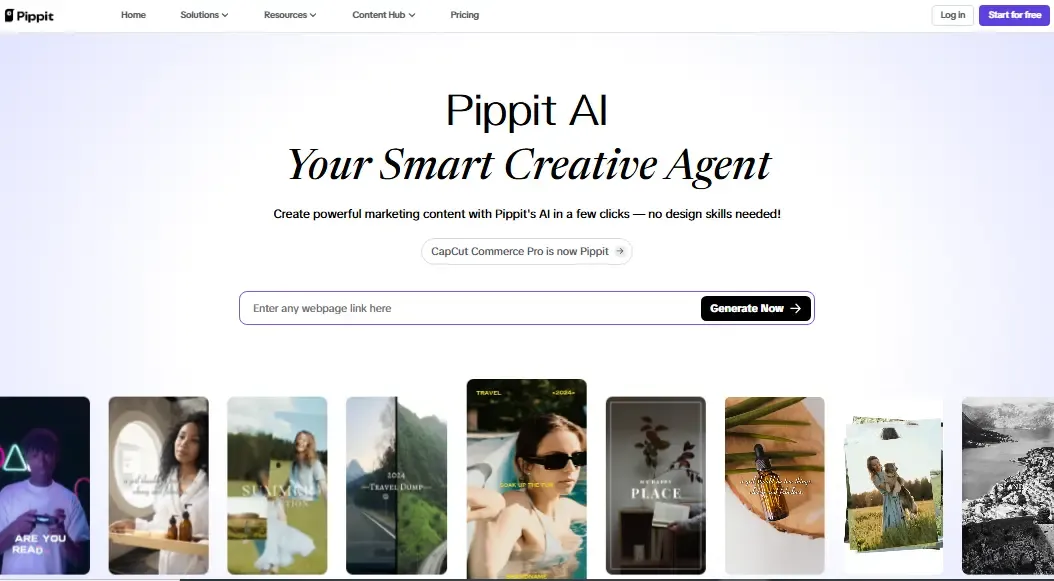
Lastly, Pippit. Pippit for poster design. Pippit aligns text automatically, controls contrast, and optimizes white space. These small details ensure your message never gets lost. Templates are already optimized for readability, whether viewed on smartphones, tablets, or large displays.
When you hire graphic design support, you do not just need someone who can make creatives and has mastery over tools.
You need someone who can plug into your workflow quickly, follow brand direction, respond on time, and handle recurring design requests without constant supervision. That is where Wishup stands out.
Why Choose Wishup for Graphic Design Support?
Wishup is built for businesses that want more than just one-off creative help. Wishup VAs are selected from the top 0.1% after a rigorous 6-step screening, ensuring high-quality graphic design work.
They support over 50 industries, including e-commerce and content creation, with skills in visual content like thumbnails and repurposed graphics. Wishup’s design VAs:
- Can design a PowerPoint presentation for professional slides.
- Provide social media management, including graphics and visuals for posts.
- Create content repurposing into visuals like thumbnails, memes, and short-form video edits.
- Are well-versed in project management and time-allocation based on requirements as well.
- Are AI-trained in tools like Canva, boosting creativity for branding and marketing materials.
Hire a graphic design virtual assistant from Wishup to manage recurring creative tasks like social media graphics, presentations, branded assets, and day-to-day design requests with greater speed and consistency.
Wrapping Up
A graphic design virtual assistant can be a practical solution for businesses that need consistent creative support without building a full in-house design team.
From social media graphics and promotional visuals to presentations, branded templates, and day-to-day design support, they help keep creative work moving efficiently.
When paired with the right tools and a clear workflow, a graphic design VA can improve speed, consistency, and overall output across your visual content needs.
FAQs
What are the tasks you can delegate to a graphic design VA?
A graphic design VA can handle a wide range of recurring creative tasks, including social media graphics, promotional posters, presentation design, branded templates, email banners, simple website designs, ad creatives, image resizing, catalog visuals, and other day-to-day graphic design tasks.
They can also support creative workflows by updating existing assets, repurposing content into visuals, and maintaining brand consistency across channels.
How much does it cost to hire a virtual assistant?
The cost of hiring a virtual assistant depends on the type of work, experience level, specialization, and hiring model. Managed VA plans on Wishup start at $1,299/month for 80 hrs and $1,999/month for 160 hrs.
