
Wishup VAs sign NDAs before their first day. Every VA, contractor, and consultant working under the Wishup platform signs a legally binding Non-Disclosure Agreement before accessing any client account, system, or data. Any breach of that NDA constitutes a contractual violation, and Wishup will take legal action accordingly.
If you are evaluating a VA service for your enterprise team, healthcare practice, or growing business, this blog serves as a direct answer to the question your legal or compliance team will ask: What actually happens to our data?
By the end of this blog, you will learn:
- How data security matters when you hire a VA
- The difference between NDA and BAA and its impact on the healthcare industry
- Common Data Security Risks With Virtual Assistants
- Best practices for maintaining data security
- Tools that improve it,
- How Wishup upholds their end of the bargain and does an excellent job compared to their competitors.
Why Data Security Matters When You Hire a Virtual Assistant
A virtual assistant works inside your business. Depending on the tasks you delegate, they may access your email inbox, CRM records, client files, financial documents, patient data, or internal communication tools. That access is necessary for them to do their job. However, it is also the reason data security cannot be an afterthought when hiring one.
VAs that you place inside your system handle sensitive information, so the common risks these businesses expose themselves to are:
- Data leakage due to unsecured networks
- Poorly structured access management systems
- Illegal access to confidential data
- Setting up weak passwords
The risk is not hypothetical. Let’s check it out statistically.
→ Healthcare data breaches cost an average of $9.77 million in 2024. It makes it the most expensive industry for data breaches for the 14th consecutive year, according to IBM's Cost of a Data Breach Report.
→ Healthcare data breaches typically go 213 days before they are discovered, meaning a security gap with a third-party worker can sit undetected for months before the damage is contained.
→ The global average cost of a data breach across all industries reached $4.88 million in 2024, a 10% increase from 2023, the largest annual spike since the pandemic.
→ Moreover, 46% of breaches involve customer personal data, including tax identification numbers, emails, phone numbers, and home addresses.
→ The sources also revealed that it is the healthcare and enterprise clients that carry the highest legal exposure here, and it goes beyond financial loss.
A breach involving Protected Health Information (PHI) triggers HIPAA liability. A breach involving the personal data of EU residents triggers GDPR obligations.
Neither of these resolves with a software update or a password reset; they involve regulatory investigations, mandatory breach notifications, and in serious cases, civil and criminal penalties.
The question to ask before hiring any VA is not just "are they trustworthy?" It is: what legal agreements, operational controls, and institutional protocols exist between your data and this person? A strong NDA is a start. It is not the whole answer.
NDA vs. BAA: What Healthcare Clients Specifically Need
Most businesses stop at an NDA when onboarding a virtual assistant for the healthcare industry. For general business use, that is usually enough. But if your VA is handling patient data, that is a different legal situation entirely.
Here is the distinction that matters.
What an NDA covers
An NDA, or Non-Disclosure Agreement, is a legally binding contract that prevents the VA from sharing confidential information with third parties.
Some key features of NDA are:
- It defines what counts as confidential,
- Specific time for how long the obligation lasts, and
- Rules and the remedies if it is violated.
- Specifics on the permitted usage of the confidential information
It works well for protecting trade secrets, client lists, business plans, and internal operations.
What a BAA covers
A BAA, or Business Associate Agreement, is a HIPAA-mandated contract. It applies any time a third party handles Protected Health Information (PHI) on behalf of a covered entity, which includes hospitals, clinics, private practices, and health insurers.
Key features of BAA:
- A BAA outlines exactly how PHI can be used,
- The specifics of the safeguards put in place, and
- The details on what happens in the event of a breach.
The key difference is the legal basis. An NDA is built on contract law. A BAA is built on federal regulation.
Why healthcare clients need both
If your VA is scheduling patient appointments, updating EHR records, managing billing, or handling any document that contains patient information, a BAA is not optional. An NDA alone does not satisfy HIPAA requirements.
Skipping the BAA has real consequences. HIPAA penalties for covered entities run up to $50,000 per violation. More importantly, the covered entity bears liability even if the VA caused the breach. The burden does not shift to the VA or the VA platform. It stays with you.
And if you are still in the research phase, this checklist on things to do before hiring a medical virtual assistant is a useful starting point.
7 Common Data Security Risks With Virtual Assistants
Not all VA arrangements are built the same. The risks below are common across the industry, and they are worth knowing before you hand over access to anything sensitive.
1. Data Breaches
VAs working from home may use personal, unpatched laptops or insecure Wi-Fi networks, which lack enterprise-grade protection. This poses the most common risk, which is of a data breach. If the VA’s device or network is not secure, the chances of a data vulnerability become high.
2. Using Insecure Communication Channels
Using unencrypted communication channels can expose sensitive information to interception by unauthorized parties.
3. Phishing and Social Engineering
It has been noticed that VAs can be the target of phishing attacks very easily. The attackers may trick them into revealing important information.
4. Shared Passwords, Uncontrolled Credentials
Sending login credentials over email or chat is one of the most common security gaps in VA setups. If that conversation is compromised, every account in it is too.
There is also the issue of what happens when the engagement ends, and the VA still has access to systems that were never properly offboarded.
5. Unauthorised Access and Lack of Control
Giving a VA full account access when they only need one folder, one inbox, or one tool is unnecessary exposure. Most breaches do not come from malicious intent. They come from too much access and not enough structure.
6. No Activity Monitoring,
Without any visibility into what a VA is doing inside your systems, you have no way to catch unusual behavior early. Most freelance arrangements have no monitoring at all.
7. The Freelance Gap
This is the risk that does not get talked about enough. When something goes wrong with a freelancer, there is no escalation path.
There is no account manager, no replacement protocol, and no institutional response. There is just a contract, and whatever you can recover from it.
A managed VA service changes that structure. The accountability sits with the platform, not just the individual. That distinction matters most when something goes wrong. That is when knowing the best practices helps.
9 Data Security Best Practices When Working With a VA
These are the controls that actually reduce risk. Most of them are straightforward to set up, and a good VA should already be familiar with them.
1. Create Strong Access Controls
Create pyramid-structured access control. The number of people getting access to sensitive information should lessen in lieu with how critical the data is becoming. The VA you hire should only have access to the necessary data. For that, we recommend RBAC.
2. Use role-based access
Only give your VA access to what the task requires. If they are managing your inbox, they do not need access to your CRM. If they are updating listings, they do not need admin rights. Most tools, including Google Workspace, HubSpot, and Microsoft 365, let you set granular permissions. Use them.
3. Use a password manager
Never share passwords over email, Slack, or WhatsApp. Tools like LastPass, 1Password, and Bitwarden let you share access to accounts without exposing the actual password. You can also revoke that access instantly when the engagement ends.
4. Use encrypted communication channels
You must establish a secure communication channel between the VAs. It should be hosted through a secure, encrypted communication tool.
Sensitive files and client information should not travel over unprotected email.
- Use encrypted tools like ProtonMail for sensitive correspondence,
- Platforms like Google Drive or Dropbox with two-factor authentication enabled for file sharing.
- Microsoft Teams or Zoom for video conferencing,
- Slacks, Signal for messaging
All these tools offer end-to-end encryption. However, we recommend avoiding the usage of public Wi-Fi networks or unsecured channels to share confidential data.
5. Build an offboarding checklist
When an engagement ends, revoke access immediately. This means passwords, shared drives, CRM logins, email accounts, and any tool they were added to. Most security gaps happen not because of an active breach, but because access was never removed.
6. Establish 2FA (Two-Factor Authentication)
Establish two-factor authentication for all systems going forward, especially those accounts that are accessed by VAs and freelancers. This adds an extra layer of security as it creates a second form of verification in addition to a password.
7. Use Secure Methods for File Sharing and Storage Solutions
Protect sensitive documents in your VA's device by hosting encrypted storage platforms. Tools like:
- Box,
- Dropbox Business, or
- Google Drive
All of these come with advanced security settings. However, control and monitor the access to these platforms.
8. Monitor activity
Hold periodic security audits to recognise potential vulnerabilities in your system. Tools like Hubstaff and Time Doctor give you visibility into what your VA is working on during their hours. This is not about micromanaging. It is about having a record of if something looks off and addressing it before security issues escalate.
9. Hold Regular Security Training Session
Educate your VA about the security protocol and the best practices performed at your company. You can cover the following topics:
- Recognising the phishing attacks and attempts
- How to handle sensitive information
- Sharing files safely, securely
- Software updation
Regular training sessions can keep your VAs aware and up-to-date on the security threats.
Every Wishup VA completes a dedicated Policy and Compliance test as a mandatory training module, covering how to handle sensitive information, recognize suspicious requests, and follow client-specific protocols.
The passing benchmark is 90 out of 100. A VA who scores below that gets one rework attempt.
Consistent underperformance results in removal from the program, confirmed by Jatin Kelkar, who heads VA training at Wishup. The curriculum is not static either.
According to Shay Nuggu, who oversees Wishup's training framework, the program runs on a structured feedback loop:
- VA Managers flag gaps,
- Patterns are identified across accounts,
- Root cause analysis is done, and modules are updated accordingly.
Tools and threat types that are no longer relevant get removed. Skills that clients are actively asking for get added. The result is that security awareness at Wishup is not a one-time orientation. It is a living part of the training model, updated against real client scenarios and current trends.
One thing worth noting: these controls only work if your VA actually knows how to use them correctly. Tool access without proper training is still a gap. The best managed VA services build security protocol training into onboarding, so the burden does not fall entirely on you.
Tools That Improve VA Data Security
The right tools reduce your exposure. They are not a substitute for vetting or legal agreements, but they make the day-to-day operational gaps much smaller.
How Wishup Stands Apart:
Wishup VAs are trained on 120+ tools before they are deployed, including the exact security-adjacent tools listed above: Google Workspace with permission controls, 1Password and LastPass for credential management, Slack with workspace configurations, and Dropbox with access restrictions.
This is not self-taught familiarity. It is structured training with a 90+ passing benchmark across every module, and a dedicated Policy and Compliance test built into the curriculum.
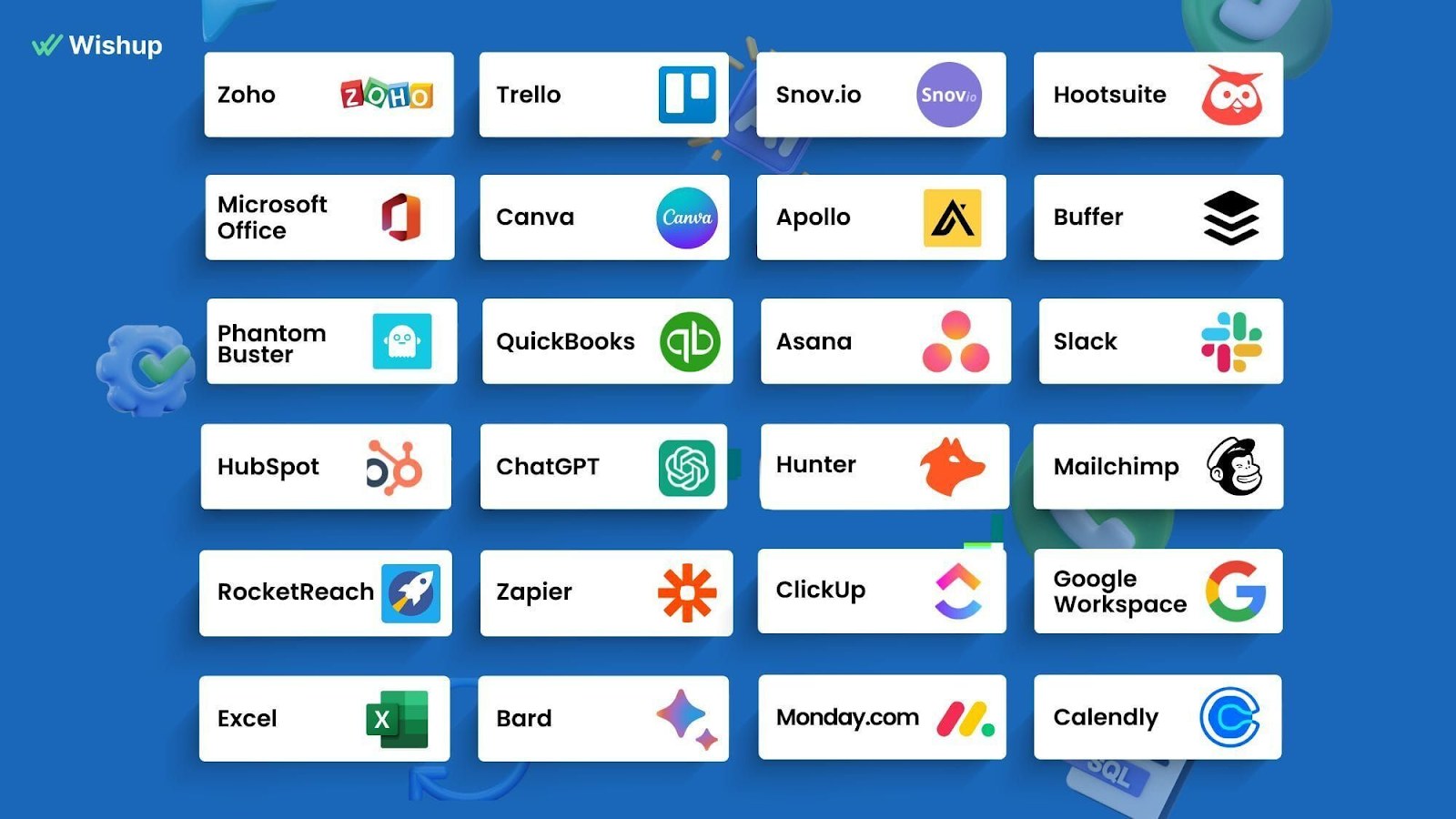
So when you hand a Wishup VA access to your CRM or inbox, they already know how role-based permissions work, how to use a shared vault without exposing credentials, and how to flag anything that looks like a phishing attempt.
You are not onboarding someone to your security stack from scratch. Let’s go through the tools that can help you improve VA data security.
5 Reasons to NOT Hire a Freelancer
There are situations where bringing in a freelancer, even a well-trained one, is not the right move.
1. When the data is too sensitive for any third-party access
Some information should not leave your internal systems at all. Attorney-client privileged documents, classified government data, and certain categories of financial records fall into this category. If your compliance team flags third-party access to the data, a freelancer is not the answer.
2. When you have no onboarding process
Handing a freelancer access to your systems without a clear onboarding structure creates more risk than it removes. If you cannot define what they can access, what they cannot, and how they will work, the engagement is not ready to start.
3. When your tools have no access control options
Some legacy systems have no role-based permissions. If you cannot limit what a freelancer can see or do inside a platform, giving them access to it is not advisable until that changes.
4. When you are not set up to monitor activity
If you have no way to log or review what happens inside your systems, you have no visibility into risk. This is fixable, but fix it before the freelancer starts, not after.
5. When HIPAA or GDPR compliance requires internal handling
Some compliance frameworks require that certain tasks be handled only by internal staff or credentialed professionals. Before delegating anything in a regulated environment, verify that third-party delegation is permitted for that specific task type.
But you can beat it and hire a managed VA service provider like Wishup, because Wishup fulfills where every outsourcing and freelancing agency fails.
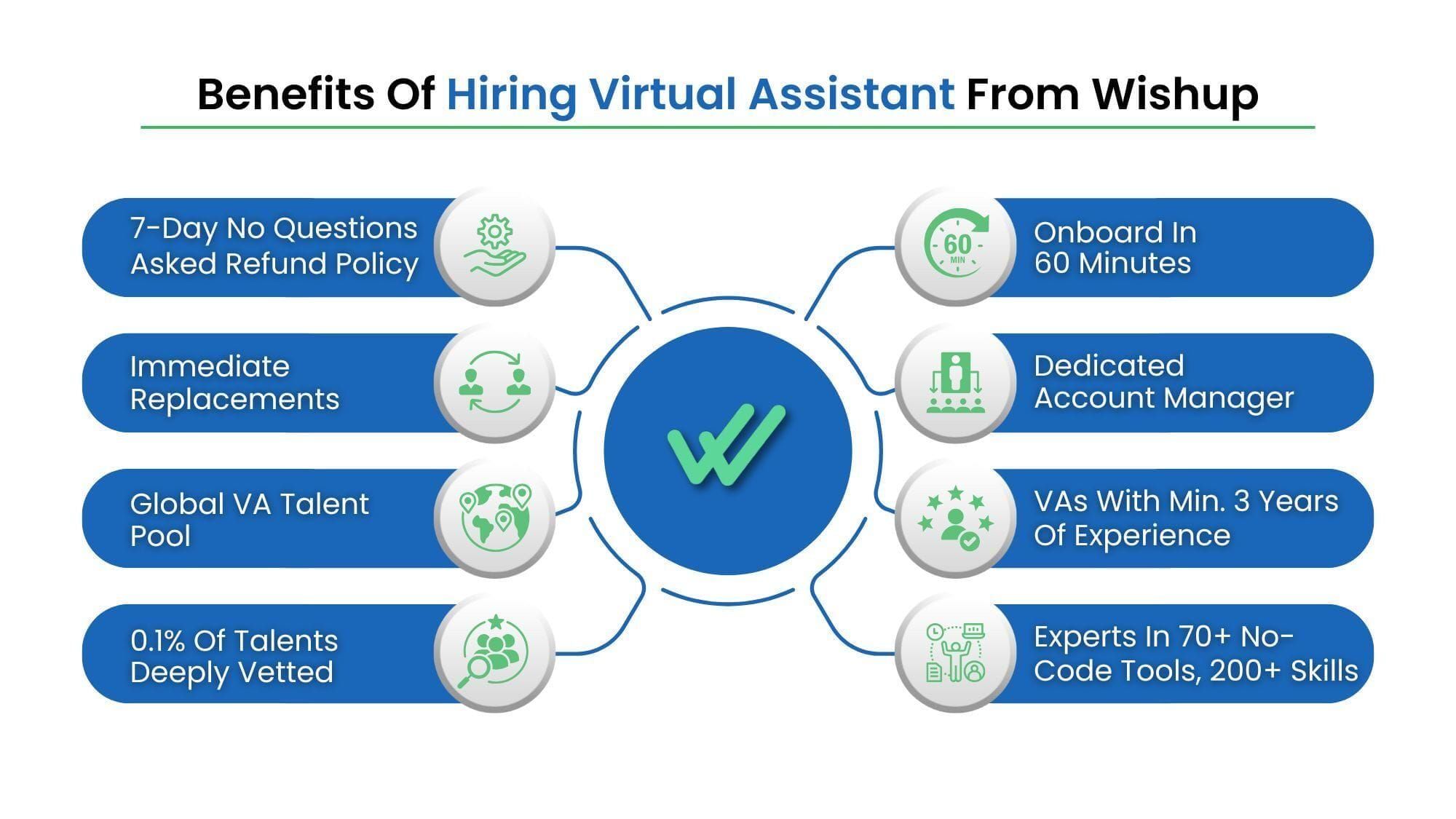
How Wishup Handles Data Security: The 10/10 Picture
Most VA services will tell you they take security seriously. Here is exactly what Wishup does, drawn from the platform's legal documents and operational policies.
1. NDA signed on day one
Every VA, contractor, and consultant working under Wishup signs a Non-Disclosure Agreement before they access any client account or system. This is not optional and it is not left to the client to arrange.
It is built into Wishup's standard onboarding. Per Wishup's privacy policy, any breach of the NDA by a VA is treated as a contractual violation, and Wishup takes legal action against the VA accordingly.
2. A 3-layer security framework
Wishup's data security is built on 3 layers: legal measures, operational safety, and IT protocols. Each layer covers a different category of risk.
Legal measures cover the contractual obligations, including the NDA every VA signs and the Data Processing Addendum available to clients who require GDPR compliance.
Operational safety covers how VAs are trained to handle client data in practice. This includes regular training programs specifically focused on reducing human error, which accounts for 90% of data breaches.
It also covers a strict policy against VAs using personal email accounts or personal IDs for client work. Every VA communicates through a secured Wishup ID only.
IT protocols cover the technical infrastructure. This includes next-generation firewalls installed on all VA systems, advanced malware, antivirus, and anti-spyware protection, real-time system tracking on all VA devices to flag unauthorized access, cloud-based data storage, and regular data backups to prevent loss.
3. Screen monitoring available
Clients who want an additional layer of visibility can monitor their VA's screen in real time. This is not mandatory, but it is available, and it is a meaningful option for enterprise teams or regulated industries handling sensitive data.
4. Client-supplied equipment accepted
If your organization has internal IT policies that require work to be done on company-approved hardware, Wishup accommodates that. Clients can provide their own systems for their VA to use, ensuring full compatibility with your internal security stack.
5. GDPR-compliant Data Processing Addendum
Wishup's DPA is prepared in compliance with GDPR Articles 28 and 29. Under the DPA, Wishup acts as the data processor, and the client is the data controller.
Wishup confirms it will only process client data in accordance with the client's instructions, and only to the extent necessary for service delivery. Data processing is limited to the duration of the client's subscription, and the client determines that duration.
Wishup also covers data security measures explicitly:
- encryption and pseudonymisation of personal data,
- ongoing confidentiality and integrity of processing systems,
- timely restoration of data access in the event of a technical incident, and
- regular testing of technical and organisational security measures.
6. Sub-processors are disclosed
Wishup discloses the full list of sub-processors in its DPA. As of the last update, these include AWS for server infrastructure, Zoho for billing, Pipedrive for CRM, Zapier for operational processes, and a small number of other service providers.
Clients can request copies of sub-processor agreements, and if Wishup adds new sub-processors, clients are notified within 30 days.
7. Security breach notification within 48 hours
If a security incident occurs, Wishup's DPA commits to notifying the affected client within 48 hours of becoming aware of it.
The notification includes the nature of the incident, the date and time it occurred, the number of users affected, categories of data involved, measures taken to contain it, and contact details for follow-up. This is a documented obligation, not a general promise.
8. Data deletion on termination
When a client's subscription ends, Wishup either deletes the client's personal data or makes it available for retrieval. This is subject to any legal obligations that require retention, but the default is deletion or return, not indefinite storage.
9. Security audit rights
Clients who want to verify Wishup's security measures can request a security audit in writing. Wishup reviews the request and, if satisfied with its reasonableness, allows the client to carry out the audit. This is an option that most freelance arrangements simply do not offer.
10. The accountability difference
This is the point that matters most for enterprise and healthcare clients. With a freelancer, the only accountability is the contract you signed with that individual. If something goes wrong, the response depends entirely on what that contract says and whether the person honors it.
With Wishup, the accountability sits at the platform level. There is a dedicated account manager responsible for your engagement.
There is a replacement protocol, and replacement VAs go through the same NDA signing and security onboarding before touching any client system. There is an institutional incident response process, not just a personal one.
For healthcare practices where a data incident carries regulatory consequences, it is not optional.
Wrapping Up
Hiring a virtual assistant means extending access to someone outside your organization. That is not a reason to avoid it. It is a reason to structure it properly.
The businesses that run into trouble are not the ones that delegated too much. They are the ones who delegated without the right legal agreements, without access controls, and without any institutional accountability behind the person they hired.
An NDA sets the legal baseline. A BAA covers you if your VA handles patient data. A DPA covers you if your clients are based in the EU. Role-based access, encrypted communication, and activity monitoring handle the operational layer. And the platform you hire through determines what happens if any of that breaks down.
Wishup builds all of this in by default, so you are not assembling a security framework from scratch every time you bring on a new VA. If you are a growing business looking to delegate without the compliance headache, that structure matters more than most people realize before something goes wrong.

Author - Neelesh Rangwani · Co-founder at Wishup
With 10+ years in the virtual assistant space, Neelesh has helped 1000+ US and global founders build efficient remote teams by matching them with top 0.1% virtual assistant talent. He writes about virtual assistants, hiring frameworks, remote productivity, and scaling ops.
More posts by Neelesh → · Connect on LinkedInFAQs
Is my data safe when I hire a virtual assistant in the US?
It depends on how the engagement is structured. A VA working through a managed platform with signed NDAs, access controls. However, activity monitoring is a very different arrangement from a freelancer hired directly with no formal agreements. In the US, data protection obligations vary by industry.
Healthcare clients need HIPAA compliance. Businesses handling EU resident data need GDPR coverage. The safety of your data is determined by the legal agreements in place, not by geography alone.
Do virtual assistants need an NDA with clients?
Yes, a personal assistant confidentiality agreement is standard practice for any VA handling sensitive business information. It defines:
- what is confidential,
- how long the obligation lasts,
- what the VA can and cannot do with the information, and
- what happens if the agreement is violated.
At Wishup, every VA signs an NDA before their first day, as a platform-level requirement, not something the client has to request or arrange separately.
How does a VA play a role in securing client data?
A VA's role in data security is largely operational. They are responsible for using only approved communication channels, not storing client data beyond what the task requires, following access protocols set by the client, and flagging anything unusual.
At Wishup, VAs are trained specifically on these responsibilities through regular data security programs, because human error accounts for 90% of breaches.
What is an NDA in the context of a virtual assistant?
An NDA, or Non-Disclosure Agreement, is a legally binding contract between the client and the VA that prevents the VA from sharing confidential business information with third parties.
It typically covers trade secrets, client records, internal processes, financial data, and any other information the client designates as confidential.
For businesses that need tighter coverage, Wishup's data security framework documents exactly what protections sit on top of the NDA at the platform level.
Is a DPA the same as an NDA?
No, they serve different purposes. An NDA is a confidentiality agreement between two parties that restricts the disclosure of information.
A Data Processing Addendum, or DPA, is a GDPR-specific document that governs how personal data is collected, processed, stored, and deleted.
It applies when a service provider processes personal data on behalf of a client whose users or customers are based in the EU.
Wishup's DPA is prepared in compliance with GDPR Articles 28 and 29, and it applies to all clients who engage Wishup's services.
How can a virtual assistant be a security risk?
A VA becomes a security risk when the engagement lacks structure. The most common vulnerabilities are:
- no NDA or confidentiality agreement in place,
- access to systems beyond what the tasks require,
- shared credentials sent over unsecured channels,
- no activity monitoring, and
- no offboarding process when the engagement ends.
The freelance model carries an additional structural risk; there is no escalation path if something goes wrong. A managed service like Wishup addresses this through platform-level accountability, a dedicated account manager, and an incident notification process documented in the DPA.
