
Manufacturing back-office automation is the use of software workflows, Excel macros, Python scripts, Zapier flows, and CRM-native automations to eliminate manual administrative tasks in manufacturing businesses.
Unlike factory-floor or industrial automation (robotics, CNC machines, sensors), it requires no hardware and is built and maintained by a trained virtual assistant working inside your existing tools.
This guide does not cover factory-floor or industrial automation.
Yet for most manufacturing SMBs, the back office still runs on manual copy-paste. However, for those who are feeling the bottleneck, it is the virtual assistants who can fill the gap. Wishup is a virtual assistant staffing company that trains virtual assistants in 120+ tools, including automation platforms like Zapier, Excel, Python, and Salesforce.
Hire a virtual assistant specialised in automating back-office and administrative processes in the manufacturing industry.
If you run an SMB in manufacturing, contract manufacturing, electrical infrastructure, or industrial services, and your team is still doing these tasks by hand, this is where to start.
What you will find in this guide:
- What manufacturing process automation means for back-office and admin operations
- 8 real use cases built by Wishup's virtual assistant, with steps, tools, and impact metrics
- How Wishup's virtual assistant identify and build these automations for manufacturing clients
- What it costs and how to get started
What Is Manufacturing Back-Office Automation and How It Differ From Factory-Floor Automation?
Manufacturing back-office automation is the use of software workflows, Excel macros, Python scripts, Zapier flows, and CRM-native automations to eliminate manual administrative tasks in manufacturing businesses.
Those tasks include purchase order filing, complaint documentation, invoice matching, and sales follow-ups. Unlike industrial automation (robotics, CNC, sensors), it requires no factory-floor hardware and is typically built and maintained by a trained virtual assistant.
What does the administrative and back office handle inside a manufacturing SMB?
They handle:
- Purchase orders and vendor invoices arriving by email
- Complaint forms that need to be created, filled, and filed for every customer issue
- Sales proposals that move between reps, proposal creators, and managers through a chain of manual emails
- Outbound calls followed by follow-up emails that someone types out by hand, 6 to 8 times a day
- Leads from newsletter signups sitting in someone's inbox instead of a CRM
None of these tasks requires a machine on a factory floor. They require a structured workflow, and in most SMBs, that workflow is still a person copying and pasting.
Manufacturing workflow automation replaces those manual steps with triggers, rules, and connected tools. When a PO arrives, a task is created automatically. When a complaint comes in, a folder and form are generated with one click. When an invoice shows a zero amount, an alert goes out before anyone notices the gap.
The automation process, as a result, has fewer errors and a faster turnaround, without adding headcount.
5 Benefits of Automating Manufacturing Back-Office Work
Manufacturing process automation delivers 5 measurable outcomes for SMBs across operations, finance, sales, and compliance, without adding headcount or replacing existing tools.
1. Fewer Hours Lost to Repetitive Admin
Across the 8 workflows in this guide, Wishup's virtual assistants eliminated a combined 83 hours of manual admin per month, time recovered without adding a single headcount.
Bain & Co. estimates that US businesses have lost $10.9 trillion in potential output since 2005 due to productivity stagnation, automation is the identified corrective.
To improve productivity and drive future growth, businesses will need to adopt automation, especially for knowledge-based and office-related work.
2. Errors Caught Before They Cost Money
Manual data entry in manufacturing operations creates mismatches that surface weeks after the fact. See how this works in Use Case 6.
It is noted as a result, Wishup's virtual assistant working with an industrial coil manufacturer automated saved 10 hours a month in a repetitive task, which could be erroneous.
3. Audit Trails Built Automatically
Manufacturing SMBs operating in regulated categories, for example, medical devices, industrial components, and food production, carry non-negotiable documentation requirements.
Customer complaints must be logged with specific fields. Purchase orders must be filed against sales records. Quality assurance records must be traceable. Wishup's virtual assistant builds the trail by automating the process.
4. Faster Response Across Sales and Customer Operations
In manufacturing sales, speed matters at 3 points: when a proposal request comes in, when a purchase order needs confirmation, and when a customer needs a follow-up after a support interaction.
Automated workflows eliminate the wait. Wishup's virtual assistant working with a medical device manufacturer automated the PO process with email confirmation to create a trail of notification. He also set up follow-up emails for better communication and a personalized touch.
5. Operations That Scale Without Adding Headcount
Did you know automation scales with volume at near-zero marginal cost? An automation that files 10 POs a month can file 100 without any additional effort. A complaint documentation workflow that runs twice a week runs 20 times a week the same way. The operational overhead stays flat while output grows.
8 Manufacturing Back-Office Automations Built by Wishup's Virtual Assistants
Following are 8 use cases of Back-Office Automations:
Use Case 1: Automated Complaint Form & Folder Creation (Excel Macro)
Every time a customer complained about a faulty device, the team had to manually create a folder, fill out a detailed form (customer name, facility, phone, email, device serial number, complaint description, patient involvement, return status), convert it to a PDF, and save everything in the right place. Every field, every time, by hand. This took 10 to 15 minutes per complaint.
How the Wishup's Virtual Assistant Automated It
Using an Excel macro, the virtual assistant built a one-click automation. All complaint details are entered once into a structured Excel sheet. One button click triggers the rest: folder creation, form filling, PDF conversion, and filing.
Steps in the Flow
Use Case 2: Order Confirmation & Audit Filing (Python + Fishbowl)
Every time a purchase order came in, someone had to manually copy the customer name and sales order number from the inventory system, search for the matching purchase order file, create a named folder, and save the file inside it.
This had to happen for every single order to maintain records for audits. It took around 10 minutes per order and happened 4 to 5 times a day.
How the Wishup's Virtual Assistant Automated It
Using Python, the virtual assistant built a script that handles the entire filing process automatically. As soon as an order is processed, the automation sends a confirmation email and sales order receipt to the customer, creates the correctly named folder, finds the matching purchase order file, and saves it, all without any manual steps.
Steps in the Flow
Use Case 3: Outbound Call Follow-Up Email Automation (Excel Macro + Conditional Logic)
After every outbound customer check-in call, the team had to write and send a personalised follow-up email, with different content depending on whether the customer picked up or not, and manually attach the right files each time. With 6–8 calls per day, this added up fast.
How the Wishup's Virtual Assistant Automated It
Using an Excel macro, the virtual assistant built a simple input sheet. The virtual assistant enters the customer's name, email, and call status (answered or not). The automation picks the right email script, personalises it with the customer's name, attaches the correct files, and sends it, all automatically.
Steps in the Flow
Use Case 4: Sales Proposal Routing in CRM (Salesforce Native Flow)
When a new sales order came in, the sales rep had to manually email a separate team member to create a proposal. That person would create it independently, email it back, and the sales manager would then follow up to move things forward. The whole chain was manual, slow, and easy to drop.
How the Wishup's Virtual Assistant Automated It
The virtual assistant built a native Salesforce workflow, no third-party tools, no AI. A button was added directly inside Salesforce. When clicked, it triggers an automated record flow: the proposal request goes to the right person, they upload the completed proposal back into Salesforce, and the sales manager can act on it, all within one system.
Steps in the Flow
Use Case 5: Newsletter Subscriber to CRM Lead Capture (Salesforce + Web-to-Lead)
When someone subscribed to the company newsletter, the marketing team had to manually track who subscribed, add each person as a new lead in Salesforce, and then notify the sales manager to follow up. This was slow, inconsistent, and prone to duplicates.
How the Wishup's Virtual Assistant Automated It
The virtual assistant connected the newsletter platform (Issuu) to the company website, generated a web-to-lead HTML form from Salesforce, embedded it on the website, and built a Salesforce flow. Now, every new subscriber automatically becomes a lead in Salesforce, with deduplication logic to prevent the same person from being added twice.
Steps in the Flow
Use Case 6: PO-Invoice Amount Matching & Discrepancy Alerts (Zapier + Asana + ServiceTitan)
Every time a purchase order or invoice came in, someone had to manually create a task for it and then check whether the amount matched what was expected in the system. With multiple POs coming in regularly, this was tedious and easy to get wrong; mismatches slipped through unnoticed.
How the Wishup's Virtual Assistant Automated It
Using Zapier, the virtual assistant built a workflow that picks up every incoming PO or invoice, creates a task in Asana automatically, and cross-checks the amount against the corresponding record in ServiceTitan. If something doesn't match, an email alert goes out immediately, no manual checking needed.
Steps in the Flow
Use Case 7: Zero-Amount Invoice Detection & Alert (Zapier Agent)
Invoices were sitting at zero, meaning they were either incomplete, forgotten, or never properly closed, and were going unnoticed. No one was systematically checking for them. By the time someone caught the gap, it had already quietly cost the business money.
How the Wishup's Virtual Assistant Automated It
Using a Zapier Agent, the virtual assistant built a filter that continuously watches incoming POs and flags any that show a zero amount. Instead of waiting for a human to notice, the automation compiles all flagged invoices and sends an email alert listing every PO code that needs attention.
Steps in the Flow
Use Case 8: Estimate Request Filing & Job Scheduling (Zapier + Asana + ServiceTitan)
When a customer emailed in a request for an estimate, someone had to manually read the email, upload the details, create a task for it, and separately enter it as a job in the scheduling system. Every estimate meant re-typing the same information across multiple tools, slow, repetitive, and easy to delays.
How the Wishup's Virtual Assistant Automated It
Using Zapier, the virtual assistant connected Gmail, Asana, and the job scheduling system into one seamless flow. The moment an estimate request lands in the inbox, it automatically becomes a task in Asana and a job in the scheduling system, with the Asana task updated to reflect that the job has been booked. No manual re-entry at any step.
Steps in the Flow
How much time has been saved by this automation?
How Wishup's Virtual Assistants Can Build Manufacturing Back-Office Automations For You
Most manufacturing SMBs know which tasks are inefficient. What they lack is someone with the time, technical skill, and process thinking to turn that inefficiency into a working automation, and then maintain it.
Wishup's Virtual Assistants close that gap. Here is exactly how Wishup's Virtual Assistant approaches automation inside a manufacturing operation:
Step 1: Map the manual task before touching any tool.
Before building anything, the virtual assistant documents the current process step by step. What triggers the task? What data is needed? Where does it go? Who touches it?
This mapping phase surfaces the edge cases, the complaint that comes in without a serial number, the PO that arrives from a new vendor with a different format, which breaks automations built without it.
Step 2: Identify the right tool for the task.
Not every automation needs the same tool. A document generation task with structured inputs is best handled with an Excel macro or a Python script. A cross-platform trigger, an email arriving that needs to become a CRM record and a task in a project management tool, is better handled with Zapier.
A CRM-native routing workflow stays inside Salesforce. Wishup's Virtual Assistants are pre-trained in 120+ tools and choose based on the task, not based on what they happen to know.
Step 3: Build, test, and refine against real data.
The virtual assistant builds the automation against actual data from your operation, real PO formats, real complaint types, and real email templates. They test every edge case before handing it to the team.
A deduplication rule gets tested against existing CRM contacts. A zero-amount filter gets tested against normal invoices to eliminate false positives. The automation runs reliably from day one because it was built against reality, not a clean test environment.
Step 4: Monitor and iterate as the operation evolves.
Wishup's Virtual Assistant monitors active automations, catches failures early, and updates the logic as your business grows. This is the difference between a one-time build and a system that compounds value over time.
Did you know 86% of employees want to use automation, but only 30% of business leaders have granted access to it. Apparently, the major reason behind it is the cost and the lack of technical and digital knowledge of the workers.
In that case, Wishup's Virtual Assistant has got you covered. We choose the creme de la creme in the industry and train them across 15 categories for maximum efficiency.
How Much Does It Cost to Hire a Wishup's Virtual Assistant for Manufacturing Automation?
Wishup's Virtual Assistant who builds and manages manufacturing process automations starts at $1,299/month, for 4 hours, compared to $45,000 to $65,000 per year for a full-time operations or admin hire who may not have the automation skill set at all.
The cost comparison below reflects what manufacturing SMBs actually spend when they staff this work through traditional hiring versus Wishup's Virtual Assistant engagement.
The 3 Wishup's virtual assistant tiers differ by skill depth and scope:
- Prime virtual assistant at $1,299/month (4 hours/day), $1,999/month (8 hours/day)
- Elite virtual assistant at $1,999/month (4 hours/day), $2999/month (8 hours/day)
- US-Based virtual assistant at $3000/month (4 hours/day), $5400/month (8 hours/day)
All 3 tiers include:
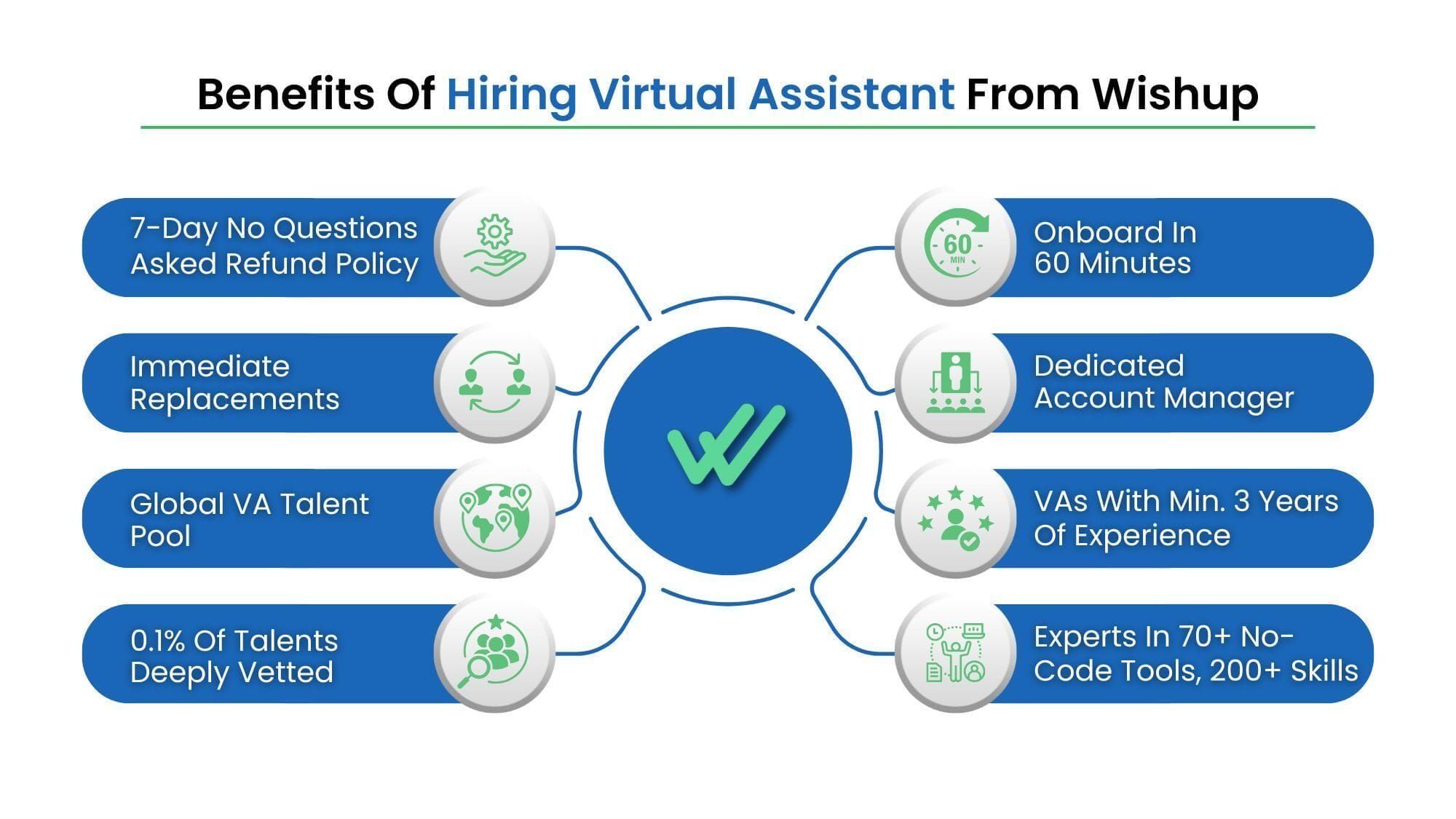
- NDA signed before work begins
- Dedicated account manager who monitors virtual assistant performance and adjusts scope as needed
- Instant replacement guarantee, if your virtual assistant is unavailable, a trained replacement steps in with zero downtime
- Onboarding completed in 60 minutes
- No equipment costs, no benefits, no HR overhead
Frequently Asked Questions: Manufacturing Process Automation
Which back-office tasks in manufacturing are easiest to automate first?
The 3 manufacturing back-office tasks with the fastest automation ROI are invoice and purchase order filing, customer complaint documentation, and outbound follow-up emails.
Do Wishup's virtual assistants work with the tools a manufacturing company already uses?
Yes. Wishup's virtual assistants build automations inside the tools you already have. For example, Excel, Python, Zapier, Salesforce, Asana, ServiceTitan, Microsoft Outlook, SharePoint, Zoho CRM, and others. They do not require new software purchases or platform migrations.
The virtual assistant maps your existing workflow, identifies the manual steps that can be eliminated, and builds the automation within your current stack. Wishup 's virtual assistants are pre-trained in 120+ tools, including 70+ business tools and 50+ AI tools, and arrive at the engagement ready to build on day one without a tool learning curve.
How long does it take Wishup's virtual assistant to build a manufacturing automation?
Simple automations like document generation macros, email follow-up sequences, and single-platform CRM flows are typically built and deployed within 2 to 5 business days.
Multi-tool automations involving cross-platform triggers, deduplication logic, or conditional branching across 3 or more systems take 5 to 10 business days, depending on the complexity of the existing data structure. The build timeline is shorter when the underlying process is already documented.
Wishup's virtual assistant begins by mapping the manual workflow before writing a single line of code or building a single Zap, which reduces rework and ensures the automation handles edge cases from the start.
What is the difference between back-office automation and factory-floor automation?
Back-office automation handles the administrative and operational layer of a manufacturing business, purchase orders, invoices, complaint forms, CRM records, and follow-up emails.
Factory-floor automation handles physical production processes, robotics, CNC machines, conveyor systems, and sensors.
Back-office automation requires no hardware investment and is built using software tools like Zapier, Excel macros, Python, and Salesforce.
A trained virtual assistant can build and maintain it within your existing tool stack without an engineering hire or a software vendor.
Do I need RPA software or an automation consultant, or can a virtual assistant do this?
For the majority of manufacturing back-office workflows, document generation, PO filing, invoice matching, CRM routing, and follow-up sequences, you do not need enterprise RPA software or an automation consultant.
Wishup's virtual assistant builds these automations inside tools you already use:
- Excel,
- Zapier,
- Python,
- Salesforce, and
- Asana.
Enterprise RPA platforms like UiPath or Automation Anywhere are built for high-volume, IT-governed automation at scale. For SMBs running 20 to 100 repetitive tasks per month, a trained virtual assistant delivers the same outcome at a fraction of the cost and without a software licensing fee.
How do Wishup's virtual assistants handle sensitive data, such as POs and customer records?
Every Wishup's virtual assistant signs an NDA before beginning any client engagement. Access is scoped to only the tools and data required for the specific workflow, the VA does not have broader system access than the task requires.
Wishup's virtual assistants are trained in data-handling protocols and work within your existing access control structure. Read "Virtual Assistant NDA and Data Security: What to Verify Before You Hire" to know more.
Can a virtual assistant automate manufacturing back-office tasks?
Yes. A manufacturing virtual assistant builds and runs automations for repetitive back-office work. In eight live builds, Wishup virtual assistants automated complaint filing, order confirmations, PO-invoice matching, and more, saving over 90 hours a month combined, at 1299 dollars a month versus 70,000-plus a year for an in-house hire.
What process automation tools do manufacturing virtual assistants use?
Manufacturing virtual assistants use Excel macros, Python, Zapier, and native CRM flows (Salesforce, Asana, ServiceTitan, Fishbowl) to automate back-office workflows, starting with a task audit and building inside the tools the company already runs, rather than requiring new RPA software.
