

You don't sit down on a calm Tuesday and decide to hire an executive assistant, nor do you think about it when you have an extra budget to allocate. Executives start searching for how to hire an executive assistant when these challenges occur:
- Your calendar needs constant attention.
- Emails pile up faster than you can answer them.
- Important follow-ups slip through the cracks.
- Travel planning starts eating into your workday.
- Meeting coordination becomes a job of its own.
- Vendor communication pulls you away from higher-value work.
- Routine operational tasks begin competing with strategic priorities.
At this point, hiring a virtual executive assistant becomes a necessity. However, figuring out what kind of support you need often looks like a challenge. Many executives rush into hiring without figuring out the actual requirement. They miss out on mapping the core issues, writing a comprehensive executive assistant job description, and the technical knowledge that is required to build a process around your workflow.
This guide will take you through how to hire an executive assistant, from defining the role and evaluating costs to interviewing candidates, onboarding successfully, and deciding whether an in-house or outsourced executive assistant is the better fit for your business.
Pre-vetted, aptitude tested, onboarded in 60 minutes.
Hire a virtual executive assistant
🚀 Is It Time to Hire an Executive Assistant?
If you answer "Yes" to three or more of these questions, it may be time to delegate.
What Does an Executive Assistant Actually Do?
An executive assistant manages administrative, operational, and communication-related responsibilities that help executives focus on strategic work.
The executive assistant role looks different from one company to another, based on the requirements and the bottlenecks. In some companies, the executive assistant's responsibilities revolve mainly around calendar and inbox management and travel coordination. Others might have some more in-depth tasks like communication, stakeholder or investor management, documentation, and taking ownership of operational workflow.
Our marketing team has interviewed the in-house EAs working across different clientele. The executive assistant task lists we pulled from the interviews were vast, and they highlighted the scope of this role.
One of our EAs working with an early-stage AI finance startup spends her time mostly on the inbox, calendar, and travel. Compare that to an EA supporting a US-based home manufacturing company, where the role expanded into flyer creation, online listings, and a
gent support, eventually making her the single point of contact for an entire field team that used to ping the tech department directly for every issue. This precisely points towards the versatility of this role, or how an executive assistant role changes based on the company's requirements.
You can tailor the task list for the executive assistant role based on your company's needs and workflow. Analysing the current bottlenecks, administrative tasks, communication, and workflow clutter ensures a direction for you to curate a robust task list for hiring.
What Can an Executive Assistant Handle?
While every executive assistant's role is unique, these are the most commonly delegated responsibilities.
Calendar Management
Schedule meetings, manage priorities, and eliminate calendar conflicts.
Inbox Management
Organize emails, prioritize responses, and keep communication flowing.
Travel Coordination
Book flights, hotels, itineraries, and manage travel logistics.
Stakeholder Communication
Coordinate with clients, investors, partners, and internal teams.
Meeting Preparation
Prepare agendas, notes, action items, and follow-up documentation.
Documentation & Reporting
Maintain records, create reports, and organize business documentation.
Vendor Coordination
Communicate with vendors, track deliverables, and resolve issues.
Project Follow-ups
Track deadlines, monitor progress, and keep projects moving.
Workflow Management
Build systems, streamline operations, and improve daily efficiency.
How to Write an Executive Assistant Job Description
A strong executive assistant’s job description should be precise. It should clearly define the role, responsibilities, tool knowledge, decision-making authority, reporting structure, and expected outcome. The precision of your job description attracts the right applicants, and you can access the right talent pool.
At times, executives mix the JD of an office manager, executive assistant, and administrative assistant. These are three different roles:
| Role | Primary Focus |
|---|---|
| Executive Assistant | Executive support, calendar management, stakeholder communication, strategic coordination, workflow |
| Administrative Assistant | Departmental and team support |
| Office Manager | Office operations, vendors, facilities, and administrative logistics |
Before writing an executive assistant’s job description, it is important to define the responsibilities you want to hand over to the EA. Commonly, tasks handled by the executive assistants are:
- Calendar management
- Inbox management
- Travel coordination
- Meeting preparation
- Stakeholder communication
- Vendor coordination
- Documentation and reporting
- Project follow-up
Here is what every executive assistant job description should have before you post it on hiring portals:
Who They'll Support: Clear clarity on whom the EA supports, whether it is one executive, multiple executives, or fractional across stakeholders.
If it's the CEO, see what an executive assistant to the CEO covers.
Core Responsibilities: Analyse the current structure and find out the bottlenecks to list down the tasks, such as calendar, inbox, travel, stakeholder communication, meeting prep, reporting, and workflow management that can be delegated.
Required Skills and Tools: Skill set and tool knowledge are the core pillars for your hiring. Define the skills and tool knowledge, and industry expertise that your ideal EA candidate should have. This helps to attract the right candidate.
Working Model: Full-time, part-time, remote, hybrid, in-office, or fractional. State it plainly.
Decision-Making Authority: Set the boundaries clearly. Can they schedule meetings, approve requests, handle vendor communication, or represent you in discussions? Make these boundaries and expectations clear.
Confidentiality Expectations: EAs can have access to confidential financials, strategy, and conversations. Make the expectations clear and keep transparency from the beginning, if there are any documents the executives have to sign before taking up the job.
For what to put in writing, see our guide to virtual assistant NDAs and data security.
How Much Does It Cost to Hire an Executive Assistant?
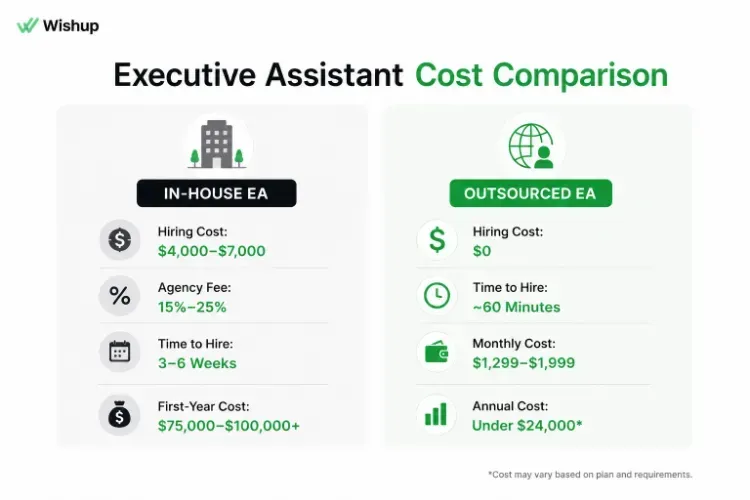
Executive assistant cost depends mostly on the hiring model. The cost of hiring depends on whether you are hiring an in-house EA or outsourcing with an EA service provider. Hiring an executive assistant in-house costs more than the salary line. SHRM's 2025 Benchmarking Report puts the average cost-per-hire for non-executive roles at $5,475 nationally. This figure only counts the visible costs, such as job board spend, recruiter fees, and background checks. It doesn't count the hours your team spends screening resumes, running interview loops, or the productivity lost while the seat sits empty.
For a role like this specifically, professional individual-contributor hires commonly land in the $4,000 to $7,000 range once agency involvement enters the picture, and agency placement fees alone typically run 15% to 25% of first-year salary on top of that. Add a realistic time-to-fill, screening and interview stages alone average 8 to 9 days each according to SHRM's data, so a full search rarely wraps in under three to four weeks, and you're carrying a real opportunity cost on top of the cash cost.
Looking for a deeper breakdown of salaries, hiring expenses, benefits, and outsourcing costs? Read our complete guide on how much an executive assistant costs before making your hiring decision.
The alternative is a managed service model, where you pay a flat monthly rate for vetted, trained support instead of running a hiring process. Wishup, for example, prices full engagements at $1299/month for 4 hours a day and $1,999/month for 8 hours a day, no recruiter fee, no payroll setup, no benefits administration. Annualized, the 8-hour plan runs under $24,000 a year, fully managed, against an in-house EA whose all-in first-year cost (salary, hiring cost, benefits, payroll administration) routinely clears $75,000 to $100,000+, depending on your market.
A managed Virtual Assistant is remote, works the hours you've contracted for, and isn't sitting in your office building, physical team culture, the way an in-house hire would. If you need someone physically present, greeting visitors, running your office five days a week, none of this applies; go hire locally. But if the job is calendar, inbox, travel, research, vendor coordination, and operational follow-through, the cost gap between building this in-house and engaging a managed service is large enough that it deserves a real comparison before you post a job ad.
If the math above makes a managed model worth a closer look, the $1,299 and $1,999 plans above include the full vetting, training, and support structure described below, not just an introduction to a freelancer. Worth fifteen minutes to see how the matching process works before you commit to either path.
If you're new to remote executive support, our guide on what a virtual executive assistant does covers the day-to-day responsibilities, common tasks, and how virtual EAs integrate into executive workflows.
Where to Find an Executive Assistant
There are 4 common hiring options. If you're considering hiring talent outside your country, our complete guide to offshore executive assistants explains how the hiring process works, the benefits, common misconceptions, and how to determine whether it's the right fit for your business. You can opt for one based on your budget, business requirements, management capacity, timeline, and whether you need an in-person or remote assistant.
Direct hire through job boards or LinkedIn: The entire process of hiring, such as sourcing, screening, reference checks, and negotiation, is completely owned by you. This is a more appropriate option if you are planning to build a long-term in-house team. It requires the bandwidth of one whole hiring team to take full control of the hiring process.
Pros
- Full control over hiring
- Culture fit
- Dedicated employee
Cons
- Time-consuming screening process
- Higher hiring costs
- No replacement coverage
A specialized staffing or recruiting agency: Faster sourcing, since they already have a candidate pipeline, but you are still the employer of record; payroll, compliance, benefits, and management all land on you. Agency fees typically run 15% to 25% of the first year's salary as a placement fee, regardless of whether the hire works out long-term or not. To compare options, see our ranking of executive assistant staffing agencies, the main providers of executive assistant staffing.
Pros
- Access to pre-screened candidates
- Faster hiring process
Cons
- Agency fees (15%-25% of annual salary)
- Payroll and management remain your responsibility
A freelance marketplace: Cheapest entry point, and the fastest place to find someone available immediately. But you are doing your own vetting on a marketplace where quality varies enormously, there is no management or backup layer if the freelancer disappears mid-project, and you become the QA function by default. This is workable for narrow, low-stakes tasks. It's a common failure point for people trying to delegate genuinely sensitive executive support; there is a reason searches around hiring an EA "without using a recruiting agency" show up as one of the most active discussion threads on this exact topic. People try the cheap, fast route first, hit a wall on reliability, and end up right back at the question they started with.
Pros
- Fast hiring
- Lower upfront cost
Cons
- Quality varies significantly
- No backup support
- Requires hands-on management
A fully managed VA/EA platform: You are not hiring an individual freelancer; you are engaging a service that has already screened, trained, and is actively managing the person working with you. If you're working out how to hire an executive assistant through a managed platform, Wishup's virtual executive assistant service is a useful reference point. Its assistants are aptitude-tested, come from the top 0.1 percent of pre-vetted applicants, and start with 60-minute onboarding. All are college-educated with 3+ years of experience, followed by 8 weeks of training across 120+ automation tools. The tradeoff is the same one above: it's remote support, not an in-office hire; It's also one provider for the assistant, payroll and compliance, instead of three vendors.
Pros
- Pre-vetted talent
- Training included
- Dedicated account management
- Backup and replacement support
- Faster onboarding
Cons
- Remote support model
Need someone for a few months while you search for a permanent hire? A managed or fractional executive assistant covers the gap.
How to Evaluate an Executive Assistant Before Hiring
While hiring an executive assistant, focus on skill sets and judgment rather than their experience in administrative tasks.
Look for these qualities:
- Strong calendar and inbox management skills
- Excellent written and verbal communication
- Ability to prioritize competing requests
- Problem-solving and decision-making ability
- Confidentiality and discretion
- Stakeholder and relationship management skills
- Attention to detail and organization
- Adaptability in fast-changing environments
Questions to ask during the evaluation process:
- How would you prioritize multiple urgent requests from different stakeholders?
- How do you manage a high-volume inbox without missing important messages?
- Tell me about a time you improved a process or workflow.
- How would you handle confidential information or financial access?
- What would you do if someone bypassed an established process and came directly to you?
If you're hiring through a managed executive assistant service, evaluate:
- Candidate screening process
- Relevant work experience
- Training and onboarding standards
- Replacement and backup support
- Ongoing performance management
The First 90 Days Determine Whether This Works
A common mistake: granting full access and full trust on day one because you're desperate for relief. The EAs we've seen succeed long-term earn expanded access in stages, and the strongest client relationships are built that way deliberately, not accidentally.
Why Founders Trust Wishup
How to Onboard an Executive Assistant in the First 90 Days
Trust, communication, and gradual delegation build a strong foundation for the relationship with your EA. Hence, planning the handover strategically is important. Here is a plan outlined for an effective onboarding:
Days 1-30: Foundation and Information Access
Focus on:
- Calendar management
- Inbox management
- Travel coordination
- Meeting preparation
- Understanding communication preferences
- Learning internal workflows
Avoid:
- Financial account access
- Sensitive client communications
- Independent decision-making on critical tasks
Days 31-60: Controlled Delegation
Begin delegating:
- Vendor communication
- Project follow-ups
- Meeting scheduling decisions
- Documentation and reporting
Introduce:
- Limited access to business tools
- Supervised handling of sensitive processes
- Ownership of recurring administrative tasks
Days 61-90: Ownership and Accountability
Transition to:
- End-to-end workflow management
- Stakeholder communication
- Vendor relationship management
- Executive support without daily supervision
- Process improvement initiatives
This plan ensures direction and control over the workflow, along with better relationships.
In-House vs Outsourced Executive Assistant: Which Is Right for You?
Both in-house and outsourced executive assistants can provide valuable support. The right choice depends on your business needs, budget, and hiring capacity.
Our outsourced executive assistant guide goes deeper on the outsourced side.
Choose an In-House Executive Assistant If:
- You need a physical office presence
- The role requires extensive internal immersion
- You're building a long-term internal leadership team
- You already have HR and recruitment resources
Choose an Outsourced Executive Assistant If:
- You need support quickly
- You want to avoid recruitment and payroll administration
- You need flexibility in hours and workload
- You want access to pre-vetted talent
- You prefer ongoing management and replacement support
What to Evaluate Before Choosing a Provider
- Candidate screening process
- Training standards
- Replacement policy
- Support structure
- Client satisfaction and retention rates
- Communication and response times
Comparing named providers like Zirtual or CoverDesk, or looking for an alternative? Ask each one the same questions. See our CoverDesk comparison.
What This Hire Actually Becomes
The mistake in most "how to hire an executive assistant" content is treating this as a transactional decision: fill the role, check the box. These two case studies are worth paying attention to: what happens after the role is filled.
“A client services lead at a non-profit financial management firm hired an EA expecting calendar and inbox support. Within months, that assistant had taken over their broken Salesforce operation entirely, cleaning years of bad data, building real-time reporting that used to take hours, and earning a seat on the company's Salesforce steering committee. A sales leader at the company later called him the differentiator on the team.”
“A founder running two companies simultaneously, a biotech startup and a healthcare credentialing platform, hired an EA to handle investor communications and stakeholder follow-ups across both ventures. What had been ad hoc and chaotic became fully systematized: tracked investor updates, structured document filing, repeatable follow-up processes. One of the two companies later credited that assistant publicly on LinkedIn as a strategic business partner, a phrase a business almost never uses for a vendor relationship.
That's the actual ceiling here. You hire for the inbox and calendar. If you scope the role right, interview for judgment instead of task completion, and pace trust deliberately over the first 90 days, what you get six months later often looks nothing like the job description you started with, and that's the point.
If you're at the stage where this hire is overdue and you'd rather skip the job board cycle entirely, Wishup's matching process runs about 60 minutes from request to introduction, vetted, trained, and backed by a manager, not just a resume. See how the matching works, or talk to a specialist about scoping the role before you write the JD.
