

A bookkeeping cleanup is usually reactive, not planned. A lender asks for financials, and you hesitate before sending them. The P&L shows a number that doesn't match your gut read on the business. You switch software and half your transactions land in the wrong bucket, and now the books look worse than before, not better.
This is what a cleanup actually involves, what tends to go wrong when people attempt it, current 2026 pricing, and how to think about DIY versus hiring it out.
A quick walkthrough of what's ahead:
- What cleanup actually means and how it's different from catch-up bookkeeping and month-end close, since people mix these up
- The warning signs: the specific red flags that mean it's time for a real cleanup, not a five-minute fix
- The process itself, step by step: reconciliation, chart of accounts, A/R, A/P, payroll, in the order that actually works
- A checklist to run the cleanup yourself, or to check a bookkeeper's work
- The mistakes that undo a cleanup and how to avoid redoing this in six months
- What it costs in 2026: real pricing from four sources, not vague ranges
- DIY vs. hiring it out: a straight answer on when each makes sense
- What to ask a bookkeeping cleanup service before you hire one

What Is Bookkeeping Cleanup?
Bookkeeping cleanup is the process of correcting and reconciling financial records that already exist in your books so they match reality. What bookkeeping cleanup involves, at its core, is repairing what's already there for a defined period, not building a new system from scratch. It's also searched as bookkeeping clean up or accounting clean up; the work is the same.
A typical cleanup covers:
- Bank and credit card reconciliations
- Corrected revenue and expense entries
- Cleaned-up accounts receivable and payable
- A P&L and balance sheet you can actually rely on
Cleanup is not tax filing. Cleanup makes your records accurate; filing a return is a separate, licensed function. Most bookkeeping teams, including ours, don't handle tax filing in-house. That work routes to a CPA or tax partner and gets billed on a project basis once the books are current.
Cleanup bookkeeping gets confused with two related terms:
- Catch-up bookkeeping: It fixes missing data, months or transactions that were never recorded. Last entry from March, and it's August? That's catch-up, not cleanup.
- Month-end close: It is the recurring monthly process that, kept up consistently, is what keeps a big cleanup project from becoming necessary in the first place.
Books that have been neglected for a while often need catch-up and cleanup together: some months are missing entirely, and the months that do exist have errors sitting in them.
Signs You Need a Bookkeeping Cleanup
Messy books don't all look the same. Broadly, businesses fall into two situations.
No real bookkeeping system yet: The owner's been doing it themselves, inconsistently, or nobody's owned it at all. This situation needs more than error correction. It needs a working chart of accounts, a categorization system, and a routine built from scratch.
A bookkeeper or software is already in place, but the output can't be trusted. Reconciliations don't tie out. Categorization is inconsistent. Reports change depending on who touches the file last. This needs targeted correction, not a rebuild, plus tighter review going forward.
Either way, watch for these:
- Bank balance in QuickBooks or Xero doesn't match the statement, even after "reconciling"
- The same expense hits both a bank feed and a manual entry
- Paid invoices still sitting in accounts receivable
- A P&L that doesn't match your gut sense of how the business is actually doing
- Undeposited funds that keep climbing for no clear reason
- A lender, investor, or buyer asked for financials, and you hesitated before sending them
If you're deciding between the two platforms, see QuickBooks vs Xero.
QuickBooks' own 2026 guidance points to nearly the same triggers: too many disconnected app integrations creating duplicate entries, unreconciled automation errors, a P&L that surprises you, and an approaching loan application or tax deadline. If several of these are true at once, this is a project to scope properly, not something to knock out over a weekend.
The Bookkeeping Cleanup Process, Step by Step
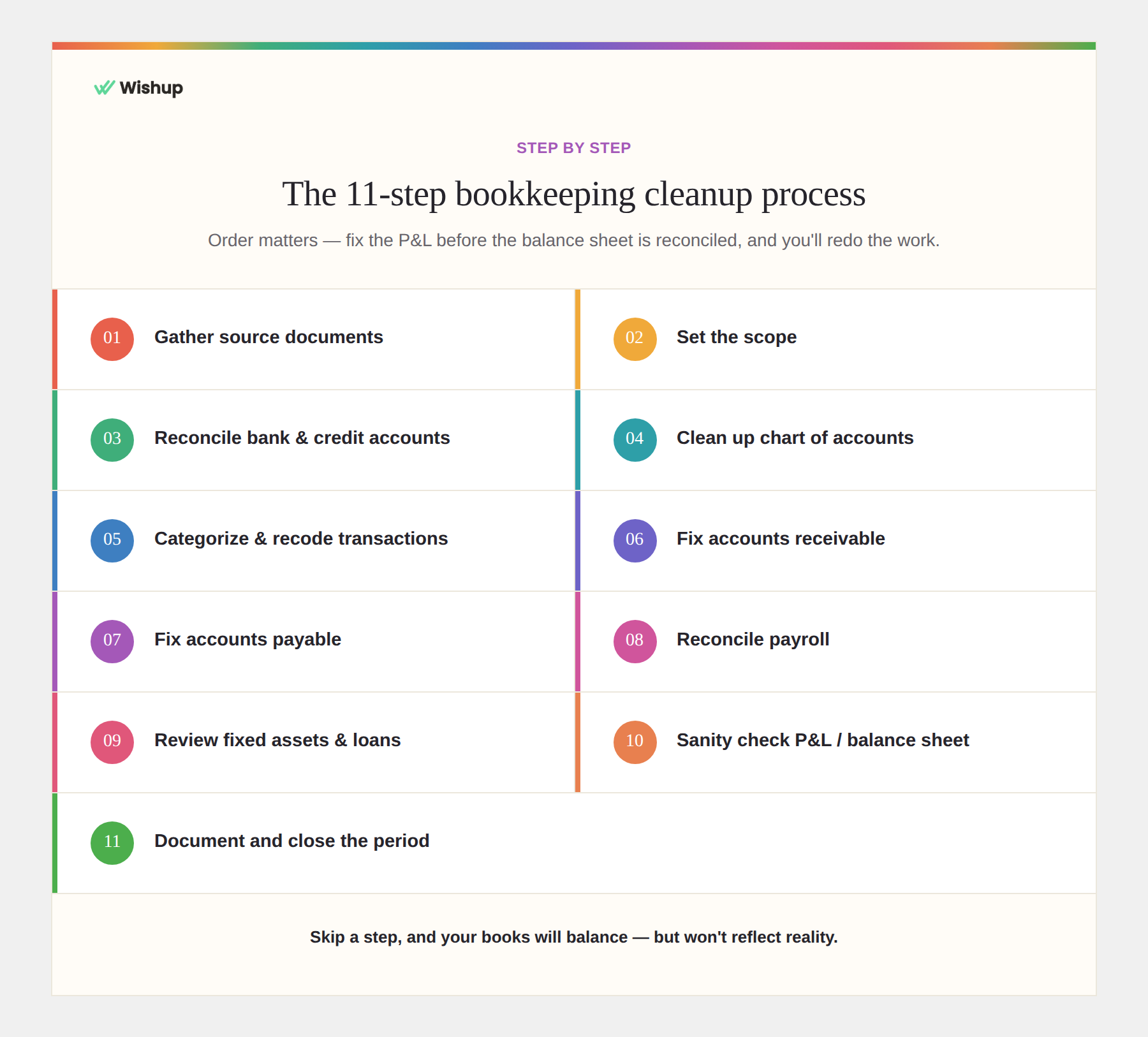
Order matters. Fix the P&L before the balance sheet is reconciled, and you'll end up redoing the work.
1. Gather your source documents: Bank statements, credit card statements, loan statements, payroll reports, sales tax filings for the exact period in question. Using Stripe or Square? Pull the payout reports too. If a document is missing, the cleanup has a hole in it, no matter how careful the rest of the work is.
(Our ecommerce bookkeeping guide covers payout matching.)
2. Set the scope: Pick the period- last quarter, the full prior year, since inception and hold the line. Open-ended cleanups sprawl, because there's always one more account that looks slightly off. If the period touches a filed tax return, treat it as a hard boundary and flag anything that could affect the filing instead of editing it freely.
3. Reconcile bank and credit card accounts: Start with the oldest unreconciled month and move forward, and never skip around. Match every transaction against the actual statement. Look for internal transfers miscoded as income or expense, duplicates from a bank feed plus a manual entry, and transactions posted to the wrong month.
Don't accept a reconciliation that balances because someone plugged the difference. Ask what caused the gap and whether the adjustment traces back to a source document. A rec that "balances" on a mystery entry isn't done; it's deferred.
4. Clean up the chart of accounts: Merge duplicates ("Office Supplies" and "Supplies Office" as two separate lines, for instance) and archive what's unused. A cluttered chart of accounts is one of the more common root causes of categorization errors. A confusing structure produces confusing entries almost by default.
5. Categorize and recode transactions: Clear out "Uncategorized" and "Ask My Accountant." Watch for personal expenses on a business card and expenses split across the wrong lines. This step usually eats the most time. Bank rules help speed it up, but check them periodically; a bad rule silently miscategorizes everything that matches it going forward, and nobody notices until months later.
6. Fix accounts receivable: Pull the A/R aging report. Close out invoices marked unpaid that were actually collected. Match payments sitting in "undeposited funds" to real deposits. Write off invoices that will never get collected instead of letting them inflate your receivables.
7. Fix accounts payable: Same exercise, opposite direction. Bills marked open that were paid, vendor credits never applied, duplicate bill entries from manual entry plus a bank feed match, all get corrected here.
Read more: Accounts Receivable Outsourcing: Hire in 60 Minutes
8. Reconcile payroll: Tie payroll expense to your provider's reports and your actual tax filings. Payroll liabilities that don't clear are a compliance risk, not a bookkeeping footnote. Don't estimate these numbers to move faster.
If payroll keeps breaking, compare HR and payroll outsourcing companies.
9. Review fixed assets, loans, and owner transactions: Confirm loan balances against lender statements and split principal from interest correctly. Owner draws and contributions belong in equity, not expense or income accounts. If significant equipment or asset purchases happened during the period, flag them for the tax professional rather than making a tax-treatment call yourself during cleanup; that decision belongs with whoever files the return.
10. Run a sanity check on the P&L and balance sheet: With the balance sheet tied out, review the P&L month over month. A category that spikes for no reason, a margin swing that doesn't make sense- investigate before calling the cleanup done. This step catches what reconciliation alone misses.
11. Document and close the period: Save reconciliation reports and a written summary of every adjustment and why you made it. Lock the period so past transactions can't be edited without deliberate action. Whoever looks at these books next - an accountant, a lender, a future you - all these need that trail.
Bookkeeping Cleanup Checklist
Setup
- Cleanup period defined
- Bank, credit card, loan, and payroll statements collected for that period
- Baseline reports exported (P&L, balance sheet, trial balance) before any changes
Bank & Credit Cards
- Every account reconciled to its statement, oldest month first
- No duplicates between bank feeds and manual entries
- Transfers coded as transfers, not income or expense
Chart of Accounts
- Duplicate accounts merged
- Unused accounts archived
- Categories named consistently
Accounts Receivable
- A/R aging matches actual outstanding invoices
- Payments applied to the correct invoices
- Undeposited funds cleared against real deposits
Accounts Payable
- A/P aging matches what's actually owed
- No duplicate bill entries
- Vendor credits applied
Payroll
- Payroll expense ties to provider reports
- Liabilities match filings and payments
Final Review
- P&L checked for unexplained month-to-month swings
- Loan balances match lender statements
- Owner draws/contributions categorized correctly
- Reconciliation reports and adjustment notes saved
- Period locked
If you're running this bookkeeping cleanup checklist ahead of tax season, do the payroll and tax-related rows first. Those are the ones with real filing deadlines attached, and errors there carry actual penalties.
6 Common Bookkeeping Cleanup Mistakes to Avoid
- Fixing the P&L before the balance sheet is reconciled: Unreconciled balance sheet accounts mean the P&L is built on numbers that will still move. Fix it now, and you'll likely fix it again later.
Example: A February payment that actually hit the bank in March gets categorized as February expense. The P&L for both months looks fine, until the balance sheet reconciliation catches the mismatch and both months' numbers have to be redone.
- Forcing a reconciliation to balance: This is the mistake that causes most of the others. A plugged, unexplained adjustment to close out a bank rec doesn't fix anything; it just hides the problem one layer deeper, where it's harder to find next time.
Example: A $340 gap that won't reconcile gets closed out as "Miscellaneous Expense" just to move on. Three months later, that same untraced gap shows up again, because the real cause is a duplicate vendor payment that was never fixed.
- Making bulk changes with no record of why: Months later, nobody, not you, not your accountant, remembers the logic behind an undocumented edit. Write down the reasoning while it's still obvious.
Example: Fifty transactions get recategorized from "Office Supplies" to "Software" in one sitting. Six months later, the accountant asks why software spend jumped, and there's no note explaining it was a reclassification and not new spend.
- Fixing the symptom, not the cause: Correcting the same categorization error every month without fixing the bank rule or process behind it just guarantees a repeat.
Example: A Stripe payout keeps landing in "Uncategorized" every month. It gets manually recoded each time instead of ever fixing the bank rule that's misreading it, so the same five minutes of cleanup repeats forever.
- Treating cleanup as one-and-done: A cleanup with no close routine afterward tends to unravel again, usually faster than people expect.
Example: Books get cleaned up in January for a loan application. By September, undeposited funds were climbing again, and three invoices were miscategorized - because nobody kept doing monthly reconciliation after the loan closed.
- Trusting automated categorization without checking it: Automated tools are fine for repetitive work, but they don't reliably catch context: a transfer that looks like income, a refund that looks like a duplicate. A person still needs to review the exceptions.
Example: An owner transfers from a personal account to cover payroll gets auto-categorized as "Income" by the bank feed. It sits there for four months, quietly inflating revenue, because no one reviewed the rule that caught it.
Keeping Your Books Clean After the Cleanup
A cleanup with no routine behind it usually just becomes next year's cleanup project.
The fix is a monthly close, done consistently: reconcile cash and cards every month rather than letting them pile up, tie A/R and A/P monthly instead of quarterly, and review anything sitting in a clearing or suspense account before it becomes a habit to ignore it. The specific cadence matters less than someone actually owning it; books drift again the moment the monthly review quietly stops happening, and nobody notices for a few months.
A steady monthly close also keeps your cash flow reports accurate. Many businesses hand this to outsourced bookkeeping services so someone always owns it.

How Much Does Bookkeeping Cleanup Cost?
Bookkeeping cleanup typically costs $300 to $10,000+, depending on how far behind the books are, transaction volume, number of accounts, and how much needs to be corrected. Current 2026 pricing published by bookkeeping firms shows a fairly wide range: simple cleanups can start around $300–$800, while cleanups covering 6–12 months commonly reach $1,500–$5,000+. Multi-year or high-volume projects can exceed $10,000.
These are market reference ranges, not fixed industry rates. The biggest price drivers are the number of months involved, transaction volume, bank and credit-card accounts, missing records, payroll, and how badly the existing books need to be reconstructed.
(The information has been gathered from various sources)
DIY vs. Hiring a Professional for Bookkeeping Cleanup
DIY bookkeeping cleanup works when transaction volume is low, the mess spans a few months, and you're comfortable with basic reconciliation. The checklist above gets you through it.
Hiring it out tends to make more sense when:
- You're several months behind and don't have the bandwidth to catch up while also running the business
- Payroll, sales tax, or inventory are involved, where the cost of getting it wrong isn't just messy books
- You need clean historical records fast for a loan, an investor, or an audit
- You've already tried a cleanup yourself and the numbers still don't tie out
On that last point: lenders and investors generally want to see records they can verify without a lot of back-and-forth. Books that don't tie out slow that process down and invite more questions, even when the underlying business is fine.
The real cost comparison is usually opportunity cost, not the invoice. Time spent untangling eight months of miscategorized transactions is time not spent running the business, and someone who does this work regularly moves through it faster than someone learning the process on their own books for the first time.
Read more: How to Hire a Remote Bookkeeper for Your Small Business
What to Look for in a Bookkeeping Cleanup Service
Not all bookkeeping cleanup services operate the same way, and a few questions are worth asking before you hire one:
Will they show their work? Ask for reconciliation reports and a documented list of adjustments, not just a "clean" file handed back with no paper trail.
Do they pair automation with human review? Tools can speed up invoice generation, transaction matching, and receipt extraction. Reconciliations, exception handling, and final accuracy checks still need a person accountable for them.
Is there a plan for after the cleanup? If the answer is no, the cleanup is temporary by design.
Can they move fast if you actually need records soon? A provider that takes weeks to onboard isn't much help against a loan deadline, however good the work eventually is.
Wishup's bookkeepers are vetted before they're matched to a client and trained specifically on the tools small businesses run on, QuickBooks and Xero included. Every engagement has a bookkeeper plus a manager overseeing the work, so review doesn't rely on one person catching their own mistakes. Engagements run part-time, full-time, or task-based depending on what the cleanup actually needs.
If your books have gotten away from you and the alternative is spending the next several weekends buried in bank statements, that's the kind of project we take on.
FAQ: Bookkeeping Cleanup
What is bookkeeping cleanup? Correcting and reconciling financial records that already exist in your books so they match what actually happened, not filing taxes, and not building a system from scratch.
What's the difference between bookkeeping cleanup and catch-up bookkeeping? Catch-up records missing transactions and periods. Cleanup corrects data that already exists but is wrong, duplicated, or unreconciled.
How long does a bookkeeping cleanup take? A light cleanup spanning a few months can take a few days of focused work. A year-plus cleanup with payroll and multiple accounts can run several weeks.
How much does bookkeeping cleanup cost? Based on current market pricing, straightforward cleanups under a year behind typically run 750–3,500. Complex, multi-year, or high-volume cleanups run higher — see the pricing table above for sourced ranges.
Can I clean up my own bookkeeping in QuickBooks? For smaller or simpler situations, yes, a QuickBooks bookkeeping cleanup follows the same order as any other: reconcile bank and credit card accounts oldest-month-first, then work through A/R, A/P, and payroll before reviewing the P&L for anything off.
Does a bookkeeper also handle my taxes? Not usually, as part of core bookkeeping. Bookkeeping covers reconciliations, entries, and reporting. Tax filing routes to an external CPA or tax partner, typically on a project basis, once the books are current.
Getting Your Books Back on Track
Work through the checklist above yourself, or hand it off. Either way, the goal is the same: books you can actually trust, and a monthly routine so you're not back here in six months.
If you'd rather skip the weekends buried in bank statements, Wishup's virtual bookkeepers can take the cleanup off your plate and set up the ongoing close process that keeps things accurate afterward.
