
What happens when you leave chasing the quotes, leaving your earnings to trust and faith because you don’t have much time? These are some tasks that do not need the involvement of the owner and can be handled by a virtual assistant for woodworking contractors.
Hire a trained virtual assistant for your woodworking business in under 60 minutes.

By the end of this blog, you will know:
- The nine tasks a woodworking contractor virtual assistant handles, from digital take-offs to invoice chasing
- How the role differs from hiring a general virtual assistant
- The software the assistant works in, including your accounting and scheduling stack
- Where the boundary sits, and what stays with you
- What the role costs in 2026, with real numbers
Who Is a Woodworking Contractor Virtual Assistant?
A virtual assistant for a woodworking contractor refers to a remote professional who handles administrative tasks along with some back-office matters. Their major tasks range from pre-construction and project coordination, handling quotations, billing, delivery scheduling, invoicing, and client follow-up.
For a wider view of how this works across building trades, see our virtual assistant for construction companies page.
What Separates a General Virtual Assistant From a Woodworking Contractor Virtual Assistant?
Although both types of virtual assistant can run your inbox, your calendar, and your books, the difference lies in the depth of knowledge in the trade and the software that comes with it. A general virtual assistant works from the instructions you give them.
A woodworking contractor virtual assistant already knows the documents, the materials and the shop software, so the instructions get shorter and the work starts sooner.
| What the Job Needs | General Virtual Assistant | Woodworking Contractor Virtual Assistant |
|---|---|---|
| Everyday admin: inbox, calendar, data entry, invoicing | Handles all of it well | Handles all of it well |
| Trade documents | Follows the format you set up for take-offs and material lists | Works take-offs, bills of quantities and change orders as routine, including your wastage margin |
| Software | Google Workspace, Calendly, QuickBooks, Xero, Dropbox | The same, plus Bluebeam Revu, Buildxact, Jobber and Buildertrend |
| Ramp-up | You teach them the trade before the work starts | Starts inside the work in the first week |
A general virtual assistant is the right hire for a shop that has its own systems and just needs hours. However, the specialist is the right hire when the systems are the problem, and you need someone who holds the knowledge in the field.
What Tasks Does a Virtual Assistant for Woodworking Contractors Handle?
A woodworking contractor virtual assistant handles nine recurring tasks across three areas. These include pre-construction and estimating, project administration and logistics, and back-office and client management. The following are the extended tasks that you can delegate to the virtual assistant for a woodworking contractor.
1. Pre-construction and estimating support
Under this category, the virtual assistant for a woodworking contractor can help you with:
- Reviewing the architectural drawings and calculating material dimensions, square footage, and linear lengths.
- Compiling the full material list for timber, hardware, finishes, and structural components, and factoring in your standard wastage margin so the number you quote is the number you buy.
- Sourcing and quote chasing. They contact lumber yards and specialist hardware suppliers, then track every response until the quotes are in.
2. Project administration and logistics
For project administration and logistics, the virtual assistant for a woodworking contractor can help you with:
- Organising the documents in cloud storage with a consistent naming structure, so your workshop always builds from the current blueprint and never cuts a sheet from last week’s revision.
- Supplier coordination. Your assistant schedules lumber, veneer and custom fitting deliveries to land in line with your production timeline, not a week after the slot has passed.
- Changing order management. Every client modification made mid-project gets documented, priced, and sent out as a revised approval sheet. Nothing gets built on a verbal agreement that nobody wrote down.
3. Back office and client management
The woodworking contractor virtual assistant manages:
- Inbox and calendar. They filter incoming enquiries, hold your project timelines, and book site consultations and installation appointments. See our inbox management service for how this runs day to day.
- Bookkeeping and invoicing. Material receipts get logged, progress payments tracked, invoices raised the moment a milestone is completed, and overdue balances chased.
- Portfolio and marketing updates. Your raw field photos of finished cabinetry and custom furniture get collected, posted to your social channels, and followed up with clients for Google reviews.
How does a virtual assistant for a woodworking contractor clear the two biggest bottlenecks?
The two most common problems shared by many woodworking contractors include:
- Chasing money and
- Managing the calendar.
Both of these can be solved with a little dedication and an hour.
A virtual assistant can set up progress billing tied to your deposit, milestones, and final stages, so each invoice triggers automatically as the job moves. Reminders go out on a fixed schedule:
- Three days before the due date, on the day,
- at seven days late, and
- again at fourteen.
Every invoice carries card and ACH payment links so a client can pay from their phone. Anything past fifteen days gets flagged for a direct call rather than another email. This is the same approach used in accounts receivable outsourcing, applied to a shop.
On the scheduling part, your virtual assistant can set up a booking link that only exposes the blocks you have set aside for field work, so nobody books a site visit during shop time. Visits get batched by neighbourhood, which cuts the unpaid driving that eats a full day.
A short questionnaire goes out before anything hits your calendar to check budget, scope, and timeline, so you are not driving forty minutes to a dead-end lead. SMS reminders go out twenty-four hours ahead to stop no-shows and locked gates.
What Software Does a Virtual Assistant for Woodworking Contractors Use?
A woodworking contractor virtual assistant works in three groups of software. Followed they are mentioned.
1. Invoicing and accounting
The virtual assistant for a woodworking contractor uses for invoicing and accounting:
- QuickBooks Online or Xero handles the bookkeeping, material receipts, and automated payment reminders.
- Stripe or QuickBooks Payments embeds card and ACH links in every invoice so clients can pay on the spot.
If you are still choosing between the two accounting platforms, our QuickBooks and Xero comparison covers the differences that matter for a trade business.
2. Scheduling and routing
The woodworking contractor virtual assistant uses, to schedule and route, the following tools:
- Calendly or Acuity Scheduling to run the booking links, complete with screening questions and SMS reminders.
- Google Maps or RouteXL to batch site visits by area so you are not crossing town twice in a day.
- Google Calendar, which will be your master calendar, to keep the shop time protected and separate from field work.
3. Project and document management
To manage the documents and projects, the virtual assistant for a woodworking contractor uses:
- Jobber or Buildertrend to track the job lifecycle, milestones, and team schedules.
- Google Drive or Dropbox to secure the drawings, architectural plans, and photo portfolio in a consistent folder structure so you can open from your phone on site.
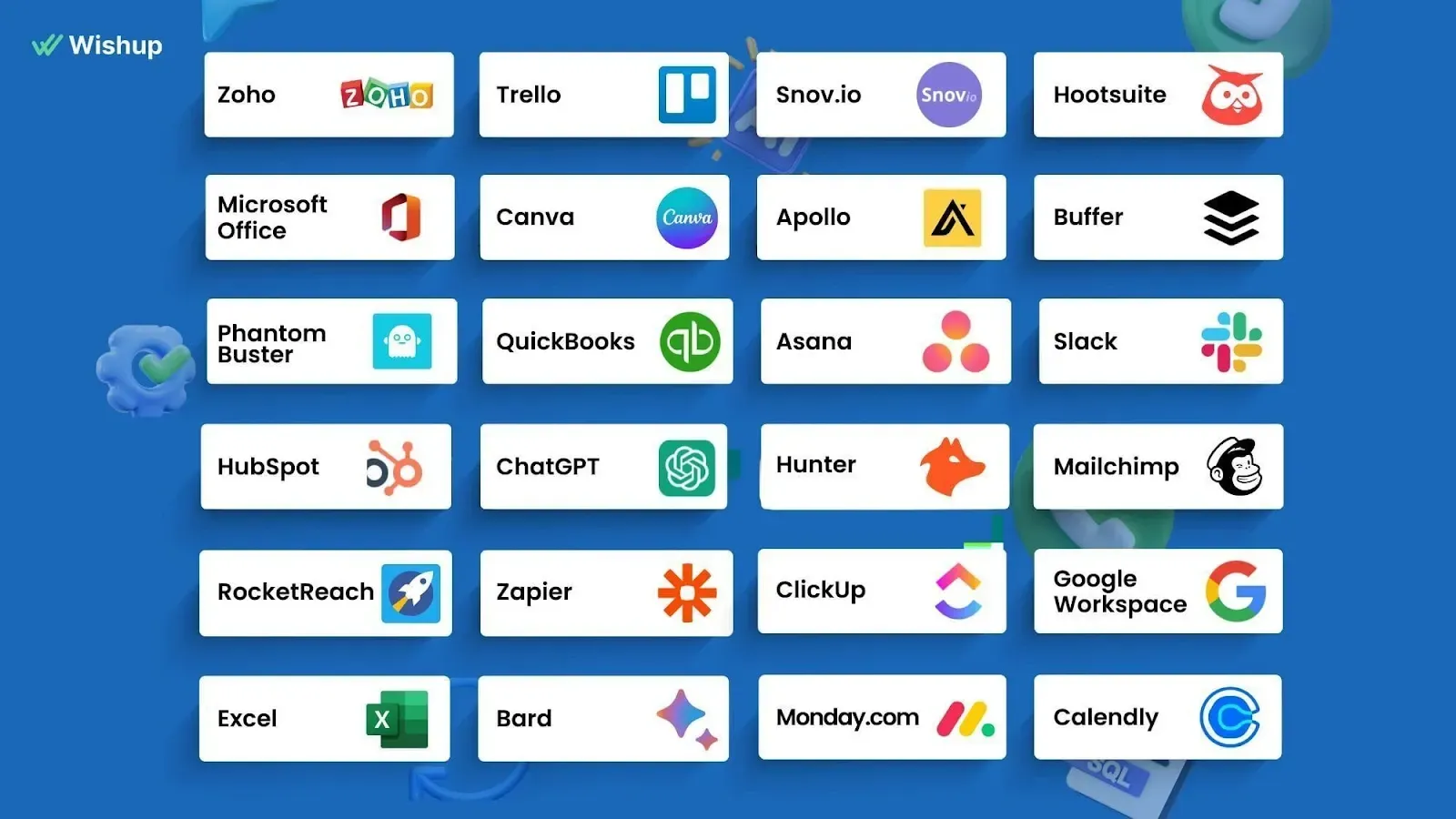
Wishup's virtual assistants are trained across 120+ tools. In practice, that means the assistant learns your stack and comes onboarded, learnt, and ready to take charge.
What Does a Virtual Assistant for Woodworking Contractors Not Do?
While the woodworking contractor virtual assistant can run the administration around your work, there are certain aspects of the job that they cannot do. The virtual assistant will not:
- Draw for you. They might cross-check the measurements, but they do not have the capacity to produce, revise, or stamp drawings. It is a task for an engineer.
- Sign off on the number that goes into the bid. They might schedule an approval for the bid and push things along the way, but signing remains with the owner.
- Agree to the scope and the price with the client because it stays with you. The virtual assistant will only document a change order and prepare the revised approval sheet.
- Get a say in how the work gets done, as it is not an administrative decision.
- Do anything that requires a license. Anything that requires a license, certification, or a physical presence in the shop.
What Are the Benefits of Hiring a Woodworking Contractor Virtual Assistant?
The benefit is not just hours saved. It is fewer expensive mistakes in the places where a shop quietly loses margin.
Across US construction, poor data and miscommunication were estimated to cost more than $177 billion in labour a year, with $31.3 billion of that going on rework, according to the Construction Disconnected report FMI produced for PlanGrid from a survey of nearly 600 construction professionals.
That study looked at construction as a whole rather than woodworking, but revealed the cause to be what almost always appears across the trade industry. So, hiring a virtual assistant for a woodworking contractor could help you with:
- Stopping the quotes from going cold.
- Payment arriving sooner.
- Having fewer rebuilds.
- Creating a streamlined visitation. Batched visits and screened leads cut unpaid driving out of the week.
- Enquiries getting answered. Nobody has to wait until the end of the day for a reply.
If you are weighing this against taking someone on in-house, our comparison of a virtual assistant and an employee covers the practical differences. Our virtual assistants even automate the repetitive tasks without having to ask to. Here's result:
Three Automations Wishup's Virtual Assistant Has Run for Their SMB Operators
Each one removes a daily admin loop from the owner's plate. The tools change from business to business. The pattern does not.
18 hours and roughly $1,080 a month across the three, measured on one trade services client running Zapier with their field service and project tools. Your numbers will move with volume, but the admin these remove is the same in most SMBs.
How to Hire a Virtual Assistant for Woodworking Contractors?
Hiring well comes down to being specific about the work before you start looking. You have to mind five steps. Starting with finding your bottleneck, listing your tool stack, testing the VA on real tasks in your ecosystem, sorting it all out before you onboard, and setting a way to measure outcomes for at least a month.
Step 1: Name the bottleneck you want cleared first.
Pick one thing that is a bottleneck for you; it can be chasing invoices, managing the calendar, or keeping the drawing folder straight. A single clear job gives you something to judge the hire against in week one.
Most woodworking contractors name invoicing or scheduling, and either is a good first handover because the result is easy to see.
Step 2: List the software the assistant will need.
Write down the stack of tools you or your employees work on. It can be the accounting platform, the scheduling tool, where the drawings live, and whichever estimating software you use. This decides which candidates can work and which need training first.
Step 3: Test on a real task, not a hypothetical.
Once you have the stack sorted, give the shortlisted candidate one of your own drawing sets and ask for a take-off and a short material list. You will learn more from that than from any interview answer.
A candidate who asks what wastage margin you use is reading the job properly.
Step 4: Sort access before day one.
You need to sort out what are the tools, documents and flows need to be given to the virtual assistant. Be it the software seats, the accounting file, the shared drive, you have to cover it with a signed NDA covering drawings and bid documents.
An assistant who spends their first week waiting for logins loses you a week. Our guide on onboarding a virtual assistant covers the setup in order.
Step 5: Set one measurable outcome for the first thirty days.
Days-to-payment on progress invoices, or the number of supplier quotes received per bid. One number, tracked, tells you whether the hire is working.
For a wider look at how this plays out across the building trades, see our guide to hiring a trade business virtual assistant.
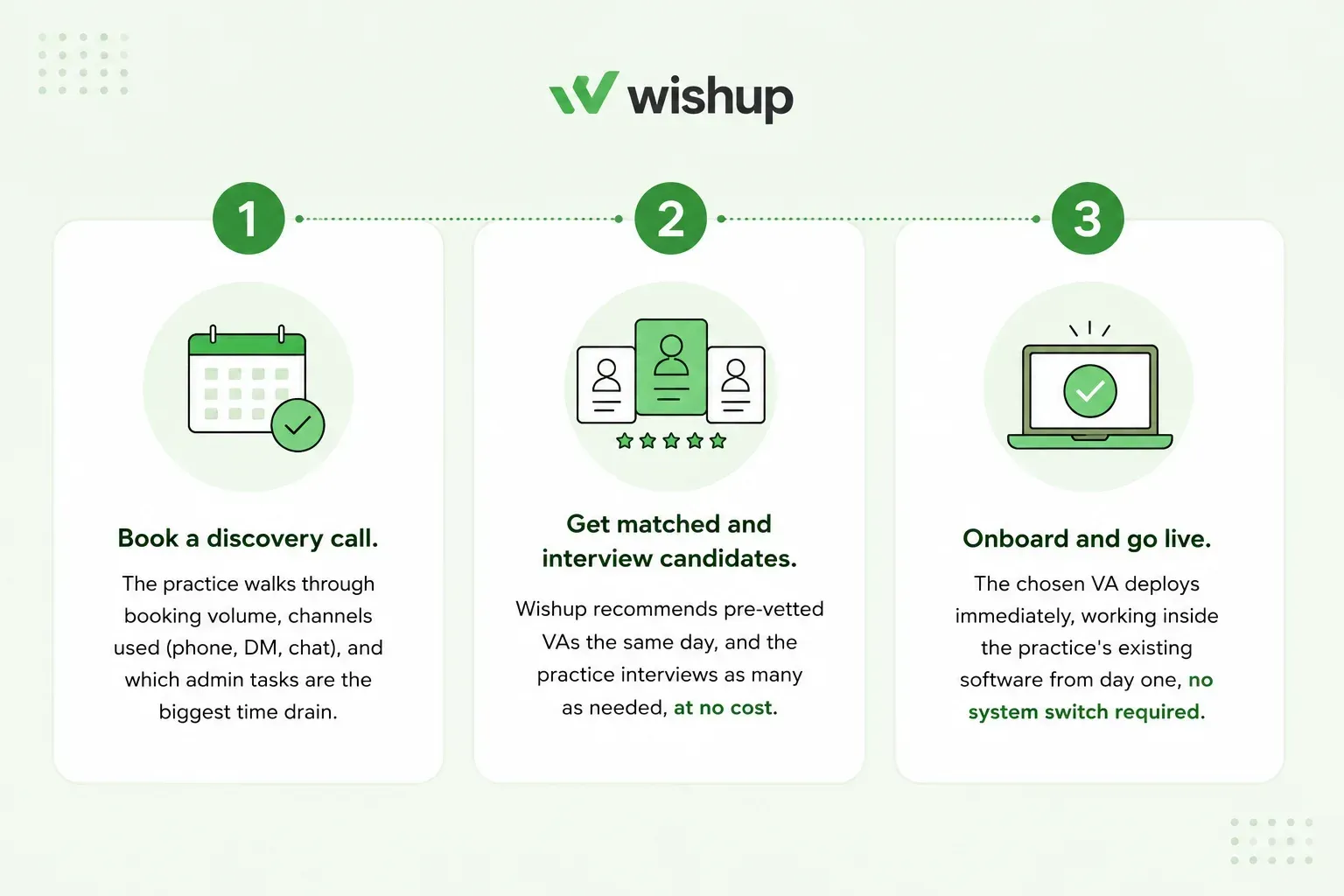
You have the flexibility to stay involved at every stage, but if you want to save time and skip the process entirely, Wishup can manage it all for you in just three steps.
Why Hire a Virtual Assistant for Woodworking Contractors From Wishup?
Wishup places pre-vetted, experienced virtual assistants who clear a six-step selection process, with only the top 0.1% of applicants making it through. They arrive trained on 120+ tools, so they can work inside your accounting file, your scheduling tool, and your drawing folders in the first week rather than spending a month learning them.
What comes with every engagement:
- 60-minute onboarding, with no multi-week hiring process
- One assistant across the whole back office, covering estimating support, supplier coordination, scheduling, and invoicing rather than splitting them across hires
- A dedicated account manager who monitors quality and handles escalations
- An instant replacement guarantee, with a trained backup available the same day
- An NDA covering your drawings, bid documents and client information
- Free business tools worth $500
Hire a virtual assistant for your woodworking business and get matched in under 60 minutes.

Let’s talk finance now. How much would they cost you at Wishup?
How Much Does a Woodworking Contractor Virtual Assistant Cost?
A Wishup virtual assistant for a woodworking business costs $1,299 to $2,999 per month depending on the hours and the plan, or $23,988 per year for full-time support.
That price covers the vetting, the training, a dedicated account manager, replacement cover, and free business tools worth $500. There is no recruitment fee, no separate onboarding charge, and no long contract.
For comparison, ZipRecruiter puts the average cost of a virtual assistant for a small business at $47,831. Against that, a managed assistant removes the recruitment, the training time and the cover you would otherwise carry yourself.
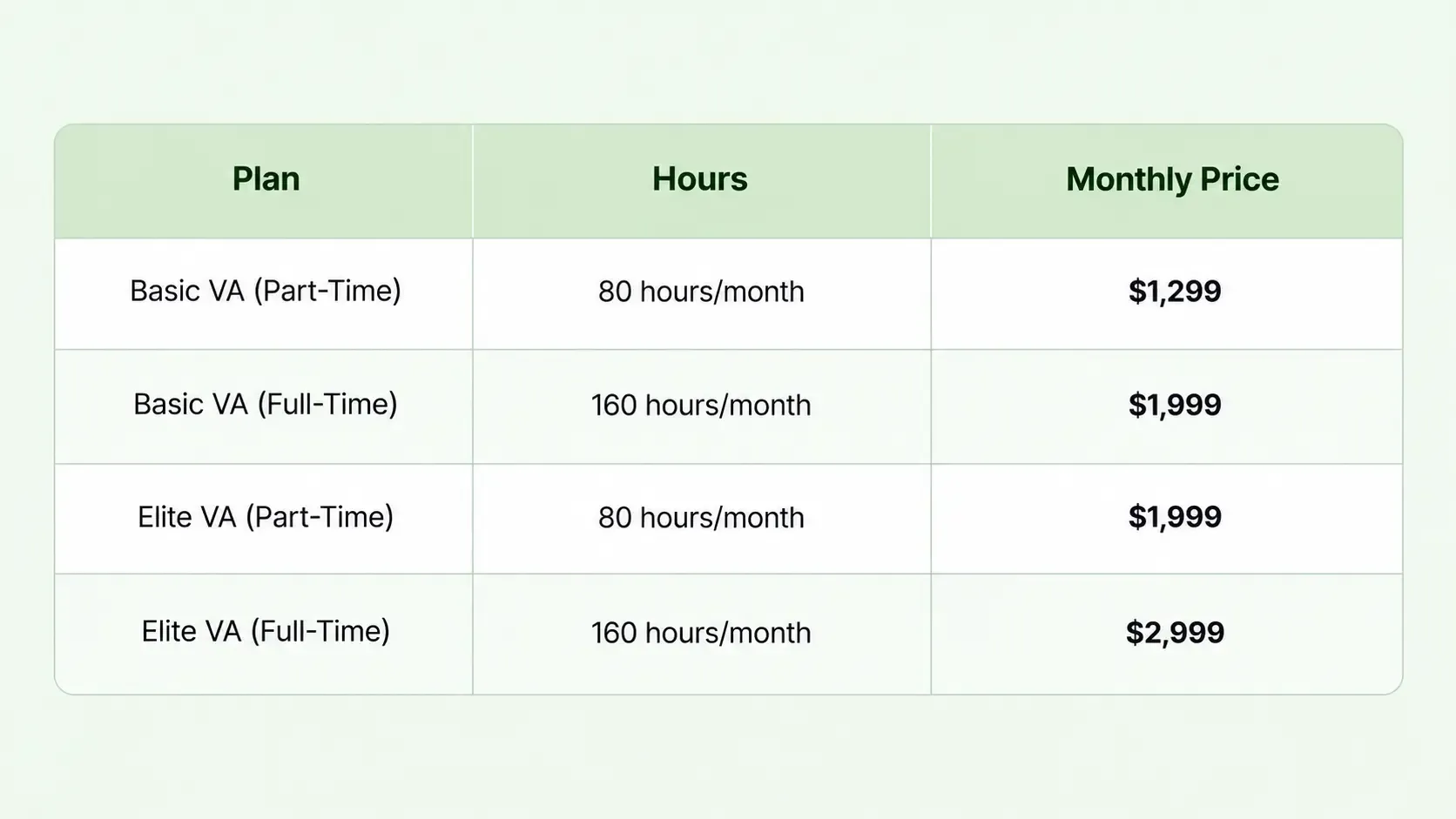
For a wider view of pricing across the different VA models, see our breakdown of virtual assistant cost.
Wrapping Up
Next time you see your calls going unanswered and invoices not getting cleared, these are some straightforward signs that signify you need to hire a virtual assistant for your woodworking business.
You can get yourself matched within 60 minutes and skip all the nitty-gritty and rigor that comes with hiring and onboarding. Come with the task list and we have got you covered.

FAQs on Virtual Assistants for Woodworking Contractors
How does a woodworking contractor virtual assistant protect job files and client payment details?
Your assistant works inside your accounting file, handles material receipts and chases client balances, so the safeguards need to be set before day one. The software seats stay on your account, which means you can revoke access at any time.
A signed NDA covers your drawings, bid documents and client information. Payment details are handled inside the accounting platform rather than copied into emails or spreadsheets. Job files live in one controlled folder with set permissions instead of being scattered across personal drives. Our remote work security guide covers the full setup.
How does millwork admin differ from cabinet shop admin?
The nine tasks are the same, but the weight shifts. Commercial architectural millwork runs on general contractor paperwork, which means submittals, approval chasing, pay applications, and lien waivers, so document control and follow-up take most of the time.
A residential cabinet shop runs on selections, deposits, and progress payments, so client communication, scheduling, and invoicing dominate instead.
Residential work also brings designers into the chain, which adds a round of approvals. Our services on virtual assistants for interior designers covers that side of the relationship.
